> ## Documentation Index
> Fetch the complete documentation index at: https://training-docs.cerebras.ai/llms.txt
> Use this file to discover all available pages before exploring further.
# Fine Tuning With Validation
> Learn how to configure and execute a fine-tuning run with upstream validation.
We'll use the LLaMA3 8B model here as an example. By the end, you should be comfortable kicking off your own fine-tuning run for the model of your choice.
Prerequisites
* You must have installed the [Model Zoo](../../getting-started/setup-and-installation).
* You must be familiar with the [Trainer](../../model-zoo/trainer-overview) and [YAML format](../../model-zoo/trainer-configuration-overview).
* Please ensure you have read [Checkpointing](../../model-zoo/components/trainer-components/checkpointing).
* Please ensure you have read [LLaMA3 8B pre-training](../../model-zoo/trainer-overview).
## Configuring the Run
There are two main flows you can use to fine-tune a model:
* Use a YAML configuration file and the Model Zoo CLI.
* Use pure Python.
They will be presented side-by-side so that you can compare the two flows as you progress through this tutorial.
Start with the Trainer configured in [LLaMA3 8B pre-training](../../model-zoo/trainer-overview). You will only need to make a few changes to this configuration to accomodate a fine-tuning run.
### Fine-Tuning Using a Pre-trained Checkpoint
To perform fine-tuning, a checkpoint from a previous training run is required. These checkpoints can be generated from previous runs or downloaded from online databases. For more information on porting a checkpoint from HuggingFace see [Port a Hugging Face model to Cerebras Model Zoo](../../model-zoo/migration/port-a-hugging-face-model-to-cerebras-model-zoo.mdx).
In this tutorial you will assume a checkpoint has already been generated after finishing [Pretraining with Upstream Validation](../../model-zoo/core-workflows/pretraining-with-upstream-validation). For simplicty, let’s assume the checkpoint saved after the final step has the path:
`./ckpts/checkpoint_10000.mdl`
### Configure Checkpoint State Loading
To enable fine-tuning, only load the model state from the checkpoint. Other checkpoint states such as the optimizer state or the training step should be reset.
If using a YAML, configure which states to load from the checkpoint using the [callbacks](../yaml/index.html#wsc-modelzoo-yaml-init-callbacks) key.
For Python, configure which states to load from the checkpoint by constructing a [`LoadCheckpointStates`](.html#cerebras.modelzoo.trainer.callbacks.LoadCheckpointStates "cerebras.modelzoo.trainer.callbacks.LoadCheckpointStates") object as follows.
```yaml YAML theme={null}
trainer:
init:
backend: # CSX
...
model: # llama
...
optimizer: # AdamW
...
schedulers: # CosineDecayLR
...
precision: # DLS
...
loop:
...
checkpoint:
...
callbacks:
...
- LoadCheckpointStates:
load_checkpoint_states: "model"
...
```
```python Python theme={null}
import cerebras.pytorch as cstorch
from cerebras.modelzoo import Trainer
from cerebras.modelzoo.trainer.callbacks import (
CheckLoss,
Checkpoint,
ComputeNorm,
LoadCheckpointStates,
MixedPrecision,
ModelEvalMetrics,
TrainingLoop,
)
from cerebras.modelzoo.models.nlp.gpt2.model import Gpt2Model as LLaMA3
trainer = Trainer(
backend=cstorch.backend("CSX", ...),
model=lambda: LLaMA3(...),
optimizer=lambda model: cstorch.optim.AdamW(...),
schedulers=[...],
precision=MixedPrecision(...),
loop=TrainingLoop(...),
checkpoint=Checkpoint(...),
callbacks=[
...,
LoadCheckpointStates("model"),
],
)
...
```
### Load From a Checkpoint
Configure the trainer to load a checkpoint from a given path.
If using a YAML, add the `ckpt_path` parameter to the `fit` key.
If using Python, specify `ckpt_path` in the Trainer’s [`fit`](../model-zoo/api/trainer-api#cerebras.modelzoo.Trainer.fit "cerebras.modelzoo.Trainer.fit") method as follows.
```yaml YAML theme={null}
trainer:
init:
...
fit:
train_dataloader:
...
val_dataloader:
- ...
ckpt_path: ./ckpts/checkpoint_10000.mdl
```
```python Python theme={null}
import cerebras.pytorch as cstorch
from cerebras.modelzoo import Trainer
trainer = Trainer(...)
trainer.fit(
train_dataloader=cstorch.utils.data.DataLoader(
...,
),
val_dataloader=[
...,
],
ckpt_path="./ckpts/checkpoint_10000.mdl",
)
```
### Putting It All Together
After the above adjustments, you should have a configuration that looks like this:
```yaml YAML theme={null}
trainer:
init:
backend:
backend_type: CSX
cluster_config:
num_csx: 16
seed: 2024
model:
# Embedding
vocab_size: 128256
hidden_size: 4096
position_embedding_type: "rotary"
pos_scaling_factor: 1.0
rope_theta: 500000.0
rotary_dim: 128
share_embedding_weights: false
max_position_embeddings: 8192
embedding_dropout_rate: 0.0
embedding_layer_norm: false
# Decoder
num_hidden_layers: 32
dropout_rate: 0.0
layer_norm_epsilon: 1.0e-5
norm_type: "rmsnorm"
# Decoder - Attention
num_heads: 32
attention_type: "scaled_dot_product"
attention_module: "multiquery_attention"
attention_dropout_rate: 0.0
use_projection_bias_in_attention: false
use_ffn_bias_in_attention: false
extra_attention_params:
num_kv_groups: 8
# Decoder - ffn
filter_size: 14336
nonlinearity: "swiglu"
use_ffn_bias: false
# Task-specific
use_bias_in_output: false
loss_scaling: "num_tokens"
loss_weight: 1.0
# Initializer
initializer_range: 0.02
# Cerebras parameters
mixed_precision: True
fp16_type: "cbfloat16"
optimizer:
AdamW:
betas: [0.9, 0.95]
correct_bias: True
weight_decay: 0.1
schedulers:
- CosineDecayLR:
initial_learning_rate: 3.0e-5
end_learning_rate: 3.0e-6
total_iters: 528
precision:
fp16_type: cbfloat16
loss_scaling_factor: dynamic
max_gradient_norm: 1.0
loop:
num_steps: 10000
eval_frequency: 1000
eval_steps: 1000
checkpoint:
steps: 1000
callbacks:
- ComputeNorm: {}
- CheckLoss: {}
- LoadCheckpointStates:
load_checkpoint_states: "model"
- ModelEvalMetrics: {}
loggers:
- ProgressLogger: {}
- TensorBoardLogger: {}
fit:
train_dataloader:
data_processor: GptHDF5MapDataProcessor
data_dir: "/data/llama_v3_dataset_vocab128256/train"
batch_size: 80
micro_batch_size: 20
shuffle: False
shuffle_seed: 1337
num_workers: 8
prefetch_factor: 10
persistent_workers: True # Important to avoid seeding at each epoch
val_dataloader:
- data_processor: GptHDF5MapDataProcessor
data_dir: "/data/llama_v3_dataset_vocab128256/val"
batch_size: 80
micro_batch_size: 20
shuffle: False
shuffle_seed: 1337
num_workers: 8
prefetch_factor: 10
persistent_workers: True # Important to avoid seeding at each epoch
ckpt_path: ./ckpts/checkpoint_10000.mdl
```
```python Python theme={null}
import cerebras.pytorch as cstorch
from cerebras.modelzoo import Trainer
from cerebras.modelzoo.trainer.callbacks import (
CheckLoss,
Checkpoint,
ComputeNorm,
MixedPrecision,
ModelEvalMetrics,
TrainingLoop,
)
from cerebras.modelzoo.trainer.loggers import (
ProgessLogger,
TensorBoardLogger,
)
from cerebras.modelzoo.models.nlp.gpt2.model import Gpt2Model as LLaMA3
trainer = Trainer(
backend=cstorch.backend(
backend_type="CSX",
cluster_config=cstorch.distributed.ClusterConfig(
num_csx=16,
),
),
seed=2024,
model=lambda: LLaMA3(
# Embedding
vocab_size=128256,
hidden_size=4096,
position_embedding_type="rotary",
pos_scaling_factor=1.0,
rope_theta=500000.0,
rotary_dim=128,
share_embedding_weights=False,
max_position_embeddings=8192,
embedding_dropout_rate=0.0,
embedding_layer_norm=False,
# Decoder
num_hidden_layers=32,
dropout_rate=0.0,
layer_norm_epsilon=1.0e-5,
norm_type="rmsnorm",
# Decoder - Attention
num_heads=32,
attention_type="scaled_dot_product",
attention_module="multiquery_attention",
attention_dropout_rate=0.0,
use_projection_bias_in_attention=False,
use_ffn_bias_in_attention=False,
extra_attention_params=dict(
num_kv_groups=8,
),
# Decoder - ffn
filter_size=14336,
nonlinearity="swiglu",
use_ffn_bias=False,
# Task-specific
use_bias_in_output=False,
loss_scaling="num_tokens",
loss_weight=1.0,
# Initializer
initializer_range=0.02,
# Cerebras parameters
mixed_precision=True,
fp16_type="cbfloat16",
),
optimizer=lambda model: cstorch.optim.AdamW(
model.parameters(),
lr=0.01, # This is a placeholder
betas=[0.9, 0.95],
correct_bias=True,
weight_decay: 0.1,
),
schedulers=[
lambda optimizer: cstorch.optim.lr_scheduler.CosineDecayLR(
initial_learning_rate=3.0e-5,
end_learning_rate=3.0e-6,
total_iters=528,
)
],
precision=MixedPrecision(
fp16_type="cbfloat16",
loss_scaling_factor="dynamic",
max_gradient_norm=1.0,
),
loop=TrainingLoop(
num_steps=10000,
eval_frequency=1000,
eval_steps=1000,
),
checkpoint=Checkpoint(steps=1000),
callbacks=[
ComputeNorm(),
CheckLoss(),
LoadCheckpointStates("model"),
ModelEvalMetrics(),
],
loggers=[
ProgessLogger(),
TensorBoardLogger(),
],
)
trainer.fit(
train_dataloader=cstorch.utils.data.DataLoader(
registry.get_data_processor("GptHDF5MapDataProcessor"),
data_dir="/data/llama_v3_dataset_vocab128256/train",
batch_size=80,
micro_batch_size=20,
shuffle=False,
shuffle_seed=1337,
num_workers=8,
prefetch_factor=10,
persistent_workers=True, # Important to avoid seeding at each epoch
),
val_dataloader=[
cstorch.utils.data.DataLoader(
registry.get_data_processor("GptHDF5MapDataProcessor"),
data_dir="/data/llama_v3_dataset_vocab128256/val",
batch_size=80,
micro_batch_size=20,
shuffle=False,
shuffle_seed=1337,
num_workers=8,
prefetch_factor=10,
persistent_workers=True, # Important to avoid seeding at each epoch
),
],
ckpt_path="./ckpts/checkpoint_10000.mdl",
)
```
## Start Fine-Tuning
Now that you have a fully configured Trainer, kick off the run and start fine-tuning:
```bash YAML theme={null}
cszoo fit ./finetune_llama_8b.yaml
```
```python Python theme={null}
python ./finetune_llama_8b.py
```
### Monitor the Run
Once compilation finishes and the Wafer-Scale Cluster is programmed for execution, you should start seeing progress logs that look like
```
| Train Device=CSX, Step=1, Loss=1.41992, Rate=16.30 samples/sec, GlobalRate=16.30 samples/sec
| Train Device=CSX, Step=2, Loss=1.41016, Rate=20.40 samples/sec, GlobalRate=19.13 samples/sec
| Train Device=CSX, Step=3, Loss=1.39062, Rate=21.93 samples/sec, GlobalRate=20.25 samples/sec
| Train Device=CSX, Step=4, Loss=1.38281, Rate=22.45 samples/sec, GlobalRate=20.84 samples/sec
| Train Device=CSX, Step=5, Loss=1.36719, Rate=22.57 samples/sec, GlobalRate=21.17 samples/sec
| Train Device=CSX, Step=6, Loss=1.42188, Rate=22.54 samples/sec, GlobalRate=21.39 samples/sec
| Train Device=CSX, Step=7, Loss=1.39258, Rate=22.52 samples/sec, GlobalRate=21.54 samples/sec
| Train Device=CSX, Step=8, Loss=1.36914, Rate=22.44 samples/sec, GlobalRate=21.64 samples/sec
| Train Device=CSX, Step=9, Loss=1.37695, Rate=22.33 samples/sec, GlobalRate=21.71 samples/sec
| Train Device=CSX, Step=10, Loss=1.35938, Rate=22.38 samples/sec, GlobalRate=21.78 samples/sec
| Train Device=CSX, Step=11, Loss=1.36719, Rate=21.32 samples/sec, GlobalRate=21.67 samples/sec
| Train Device=CSX, Step=12, Loss=1.39844, Rate=21.72 samples/sec, GlobalRate=21.69 samples/sec
| Train Device=CSX, Step=13, Loss=1.38672, Rate=21.88 samples/sec, GlobalRate=21.71 samples/sec
| Train Device=CSX, Step=14, Loss=1.34961, Rate=21.91 samples/sec, GlobalRate=21.73 samples/sec
| Train Device=CSX, Step=15, Loss=1.33203, Rate=21.88 samples/sec, GlobalRate=21.74 samples/sec
| Train Device=CSX, Step=16, Loss=1.33008, Rate=21.91 samples/sec, GlobalRate=21.75 samples/sec
| Train Device=CSX, Step=17, Loss=1.33984, Rate=21.88 samples/sec, GlobalRate=21.76 samples/sec
| Train Device=CSX, Step=18, Loss=1.31250, Rate=21.88 samples/sec, GlobalRate=21.76 samples/sec
| Train Device=CSX, Step=19, Loss=1.36133, Rate=21.91 samples/sec, GlobalRate=21.77 samples/sec
| Train Device=CSX, Step=20, Loss=1.30664, Rate=23.15 samples/sec, GlobalRate=21.87 samples/sec
| Train Device=CSX, Step=21, Loss=1.30078, Rate=22.52 samples/sec, GlobalRate=21.88 samples/sec
| Train Device=CSX, Step=22, Loss=1.31250, Rate=22.23 samples/sec, GlobalRate=21.89 samples/sec
| Train Device=CSX, Step=23, Loss=1.30664, Rate=21.10 samples/sec, GlobalRate=21.82 samples/sec
| Train Device=CSX, Step=24, Loss=1.30469, Rate=22.73 samples/sec, GlobalRate=21.90 samples/sec
| Train Device=CSX, Step=25, Loss=1.28906, Rate=21.42 samples/sec, GlobalRate=21.84 samples/sec
...
| Eval Device=CSX, GlobalStep=1000, Batch=1, Loss=1.21875, Rate=21.47 samples/sec, GlobalRates=21.66 samples/sec
| Eval Device=CSX, GlobalStep=1000, Batch=2, Loss=1.24219, Rate=22.65 samples/sec, GlobalRates=21.66 samples/sec
| Eval Device=CSX, GlobalStep=1000, Batch=3, Loss=1.26562, Rate=22.06 samples/sec, GlobalRates=21.66 samples/sec
| Eval Device=CSX, GlobalStep=1000, Batch=4, Loss=1.25195, Rate=21.90 samples/sec, GlobalRates=21.66 samples/sec
| Eval Device=CSX, GlobalStep=1000, Batch=5, Loss=1.27539, Rate=21.80 samples/sec, GlobalRates=21.66 samples/sec
| Eval Device=CSX, GlobalStep=1000, Batch=6, Loss=1.23047, Rate=21.79 samples/sec, GlobalRates=21.66 samples/sec
| Eval Device=CSX, GlobalStep=1000, Batch=7, Loss=1.22852, Rate=20.72 samples/sec, GlobalRates=21.66 samples/sec
| Eval Device=CSX, GlobalStep=1000, Batch=8, Loss=1.27734, Rate=21.24 samples/sec, GlobalRates=21.66 samples/sec
| Eval Device=CSX, GlobalStep=1000, Batch=9, Loss=1.23633, Rate=22.57 samples/sec, GlobalRates=21.66 samples/sec
| Eval Device=CSX, GlobalStep=1000, Batch=10, Loss=1.27930, Rate=22.10 samples/sec, GlobalRates=21.66 samples/sec
| Eval Device=CSX, GlobalStep=1000, Batch=11, Loss=1.23438, Rate=20.86 samples/sec, GlobalRates=21.66 samples/sec
| Eval Device=CSX, GlobalStep=1000, Batch=12, Loss=1.24609, Rate=21.31 samples/sec, GlobalRates=21.66 samples/sec
| Eval Device=CSX, GlobalStep=1000, Batch=13, Loss=1.23633, Rate=21.47 samples/sec, GlobalRates=21.66 samples/sec
| Eval Device=CSX, GlobalStep=1000, Batch=14, Loss=1.23633, Rate=21.48 samples/sec, GlobalRates=21.66 samples/sec
| Eval Device=CSX, GlobalStep=1000, Batch=15, Loss=1.21680, Rate=22.66 samples/sec, GlobalRates=21.66 samples/sec
...
```
The performance numbers that you get will vary depending on how many Cerebras systems you are using and which generation systems you are using.
If you open up the TensorBoard you can more closely monitor the run be observing the trends in the graphs of the various logged metrics.
```
tensorboard --bind_all --logdir="./model_dir"
```
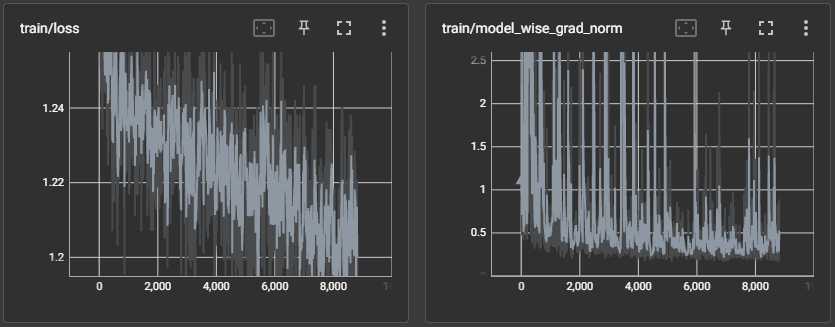 As can be seen above, the screenshots were taken at around step 8000. At this point you can observe that so far, the run seems to progressing well. The losses appear to be trending downwards and the model wise gradient norms don’t appear overly abnormal.
## Porting the Model to Hugging Face
Once the fine-tuning run has finished, you can port the model and checkpoint to Hugging Face.
To learn more about how to do this, see [Port a trained and fine-tuned model to Hugging Face](../../model-zoo/migration/port-a-hugging-face-model-to-cerebras-model-zoo).
## Conclusion
With that, you have completed your first fine-tuning run with validation on the Cerebras Wafer-Scale Cluster using the ModelZoo Trainer!
By now, you should understand how to write your own Trainer configuration and how to kick off a training job from a checkpoint on the Cerebras Wafer-Scale Cluster. You can now take this knowledge and fine-tune your very own model.
As can be seen above, the screenshots were taken at around step 8000. At this point you can observe that so far, the run seems to progressing well. The losses appear to be trending downwards and the model wise gradient norms don’t appear overly abnormal.
## Porting the Model to Hugging Face
Once the fine-tuning run has finished, you can port the model and checkpoint to Hugging Face.
To learn more about how to do this, see [Port a trained and fine-tuned model to Hugging Face](../../model-zoo/migration/port-a-hugging-face-model-to-cerebras-model-zoo).
## Conclusion
With that, you have completed your first fine-tuning run with validation on the Cerebras Wafer-Scale Cluster using the ModelZoo Trainer!
By now, you should understand how to write your own Trainer configuration and how to kick off a training job from a checkpoint on the Cerebras Wafer-Scale Cluster. You can now take this knowledge and fine-tune your very own model.