> ## Documentation Index
> Fetch the complete documentation index at: https://training-docs.cerebras.ai/llms.txt
> Use this file to discover all available pages before exploring further.
# Train a Model with Weight Sparsity
> Learn how to configure the Trainer class with weight sparsity.
Review the [Trainer Overview](../../model-zoo/trainer-overview) and [Trainer Configuration Overview](../../model-zoo/trainer-configuration-overview) to understand the basics of running Model Zoo models. This guide builds upon the tools and configurations explained in those resources.
## Background
In 2018, state-of-the-art neural networks such as BERT had a few hundred million parameters. Two years later, the world was introduced to GPT-3. With 175 billion parameters and a 3.14\*1023 FLOPs (floating point operations) compute budget, it is estimated to have required 10,000 NVIDIA V100 GPUs for 15 days, accounting for 552 tons of CO2e emissions and 1,287 MWh of energy [\[Patterson et al.\]](https://arxiv.org/abs/2104.10350).
Evidently, training large models is costly. With parameter counts and datasets getting larger and larger every year, new approaches are needed to reduce the time, energy, and carbon footprint required to train. Weight sparsity, coupled with hardware that accelerates it, is a promising way to train models using significantly less compute and memory.
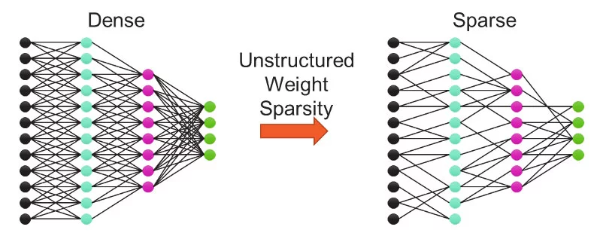 Weight sparse training methods set subsets of weights to zero. The resulting sparse model requires far fewer FLOPs to train and fewer parameters to store, as multiplies with zeros get skipped on both forward and backward passes through the network. Only systems that can accelerate sparsity, such as Cerebras CS-X and CS-3, can take advantage of the lower resource requirement and use the reduction in FLOPs to significantly accelerate training. Finding and training sparse models to match the accuracy of their original “dense” (i.e., non-sparse) configurations is an active and open area of research!
## Configure Sparsity
Let’s expand on the minimal example shown in [sparsity](../../model-zoo/trainer-configuration-overview).
For example, with the following config, the sparsity level is set to 0.3 (30%), and `init_method` is `"random"`, which means 30% of the elements in each Parameter (which passes the [default parameter filter](#sparsity-param-filter)) will be pruned once at model initialization and kept that way throughout training. Non-Parameter tensors are not pruned.
```YAML YAML theme={null}
trainer:
init:
...
sparsity:
algorithm: "static"
sparsity: 0.3
init_method: "random"
...
...
```
```Python Python theme={null}
import cerebras.pytorch as cstorch
from cerebras.modelzoo import Trainer
trainer = Trainer(
...,
sparsity=cstorch.sparse.Static(
sparsity=0.5,
init_method="random",
),
...,
)
...
```
Sparsity is parameterized primarily by the following keys:
* `algorithm`:You can also define a custom class that inherits from [`SparsityAlgorithm`](https://training-api.cerebras.ai/en/latest/wsc/api/cerebras_pytorch/sparse.html#cerebras.pytorch.sparse.SparsityAlgorithm).
* Sparsity training algorithm to apply.
* [`Static`](https://training-api.cerebras.ai/en/latest/wsc/api/cerebras_pytorch/sparse.html#cerebras.pytorch.sparse.Static) (Default): Fixed sparsity level throughout training
* [`GMP`](https://training-api.cerebras.ai/en/latest/wsc/api/cerebras_pytorch/sparse.html#cerebras.pytorch.sparse.GMP): Gradual magnitude pruning
* [`SET`](https://training-api.cerebras.ai/en/latest/wsc/api/cerebras_pytorch/sparse.html#cerebras.pytorch.sparse.SET): Sparse Evolutionary Training
* [`RigL`](https://training-api.cerebras.ai/en/latest/wsc/api/cerebras_pytorch/sparse.html#cerebras.pytorch.sparse.RigL): Rigging the Lottery
```python theme={null}
import cerebras.pytorch as cstorch
class CustomSparsity(cstorch.sparse.SparsityAlgorithm):
...
```
* YAML: As long as the class in the global scope, it can be directly used in a YAML config, e.g.
* Python: The CustomSparsity class can be passed directly to the Trainer as seen below.
```YAML YAML theme={null}
trainer:
init:
sparsity:
algorithm: CustomSparsity
...
```
```Python python theme={null}
from cerebras.modelzoo import Trainer
trainer = Trainer(
...,
sparsity=CustomSparsity(...),
...,
)
```
See Writing a Custom Sparsity Algorithm for more details on how to write a custom sparsity algorithm.
* `sparsity`:The desired sparsity level between 0 and 1. 0.0 means the Parameter is kept fully dense. 1.0 means the Parameter is effectively entirely zeros. Dynamic sparsity algorithms also accept more complex configuration described below in [Dynamic Hyperparameters](#dynamic-hyperparameters).
The actual sparsity level may not match the target sparsity level in practice. The target sparsity level only represents a target distribution. The true sparsity level is determined by the size of the Parameter that is being sparsified.
For example, if you were to sparsify a Parameter with shape (5,) targeting a sparsity level of 0.5, the actual sparsity level will only ever be 0.4. The smaller the Parameter, the more extreme this discrepancy becomes. If the Parameter is a scalar tensor, then the actual sparsity level will always either be 0.0 or 1.0.
* `init_method` optional:Method to compute the initial sparsity distribution.
* [`random`](https://training-api.cerebras.ai/en/latest/wsc/api/cerebras_pytorch/sparse.html#cerebras.pytorch.sparse.init.random): (default) Sparsity is randomly distributed within each weight.
* [`topk`](https://training-api.cerebras.ai/en/latest/wsc/api/cerebras_pytorch/sparse.html#cerebras.pytorch.sparse.init.topk): Sparsity is distributed according to the lowest magnitude weights.
* [`from_zeros`](https://training-api.cerebras.ai/en/latest/wsc/api/cerebras_pytorch/sparse.html#cerebras.pytorch.sparse.init.from_zeros): Sparsity pattern is determined by weight values that are already zero.
* `param_filter` optional:Controls which Parameters are sparsified. The list of Parameter names can be found using `model.named_parameters()`.
When this is omitted, any multidimensional Parameters (except those with `embedding`, `norm`, or `lm_head` in their name) automatically get sparsity applied (single dimensional weights such as biases are ignored) (See [`default_sparse_param_filter`](https://training-api.cerebras.ai/en/latest/wsc/api/cerebras_pytorch/sparse.html#cerebras.pytorch.sparse.configure.default_sparse_param_filter)).While this provides a good default heuristic for transformer based models [1](#conv), a (list of) glob expressions can also be provided to only apply sparsity to Parameters which match, e.g.\`\`\`Bash
trainer:
init:
sparsity:
...
param\_filter:
* "\*dense\_layer.weight"
* "\*linear\_layer.weight"
\`\`\`To match all weights, set `param_filter: *`Per-layer sparsity options can be configured by passing in a list of configuration dictionaries. See below in [advanced param\_filters](#advanced-param-filters).
### Dynamic Sparsity Update Schedule
Dynamic sparsity (e.g. [`GMP`](https://training-api.cerebras.ai/en/latest/wsc/api/cerebras_pytorch/sparse.html#cerebras.pytorch.sparse.GMP), [`SET`](https://training-api.cerebras.ai/en/latest/wsc/api/cerebras_pytorch/sparse.html#cerebras.pytorch.sparse.SET), or [`RigL`](https://training-api.cerebras.ai/en/latest/wsc/api/cerebras_pytorch/sparse.html#cerebras.pytorch.sparse.RigL)) needs an additional `update` schedule indicating when to update the sparsity pattern. There are 2 basic methods built-in with 3 different options:
#### Regular Interval
When sparsity should be updated at a regular interval, a single frequency can be given:
```YAML YAML theme={null}
trainer:
init:
sparsity:
update:
freq: 100
algorithm: set
sparsity: 0.9
```
```Python Python theme={null}
import cerebras.pytorch as cstorch
from cerebras.modelzoo import Trainer
trainer = Trainer(
...,
sparsity=cstorch.sparse.SET(
sparsity=0.9,
update=dict(freq=100),
),
...,
)
```
Here, sparsity will be initialized at 90% and steps 0,…,99 will be performed with a fixed sparsity pattern. Every 100 steps, the sparsity pattern will be updated according to the SET algorithm.
To control beginning and ending steps, use a dictionary. In the following example, sparsity will be initialized at 0% and steps 0,…,76 will be performed without sparsity. Starting from step 77 and every 100 steps until step 377, the sparsity pattern will be updated according to the SET algorithm. After step 377, the sparsity pattern will continue to be applied, but it will no longer be updated (stop is exclusive).
```YAML YAML theme={null}
trainer:
init:
sparsity:
update:
start: 77
freq: 100
stop: 477 # An update will _not_ be performed on step 477
algorithm: set
sparsity: 0.9
```
```Python theme={null}
import cerebras.pytorch as cstorch
from cerebras.modelzoo import Trainer
trainer = Trainer(
...,
sparsity=cstorch.sparse.SET(
sparsity=0.9,
update=dict(
start=77,
freq=100,
stop=477, # An update will _not_ be performed on step 477
),
),
...,
)
```
#### Irregular Interval
When sparsity should be updated at arbitrary steps, specify them in a list:
```YAML YAML theme={null}
trainer:
init:
sparsity:
update:
steps: [0, 5, 20, 50]
algorithm: set
sparsity: 0.9
```
```Python Python theme={null}
import cerebras.pytorch as cstorch
from cerebras.modelzoo import Trainer
trainer = Trainer(
...,
sparsity=cstorch.sparse.SET(
sparsity=0.9,
update=dict(
steps=[0, 5, 20, 50],
),
),
...,
)
```
### Dynamic Hyperparameters
Dynamic sparsity algorithms (e.g. [`GMP`](https://training-api.cerebras.ai/en/latest/wsc/api/cerebras_pytorch/sparse.html#cerebras.pytorch.sparse.GMP), [`SET`](https://training-api.cerebras.ai/en/latest/wsc/api/cerebras_pytorch/sparse.html#cerebras.pytorch.sparse.SET), or [`RigL`](https://training-api.cerebras.ai/en/latest/wsc/api/cerebras_pytorch/sparse.html#cerebras.pytorch.sparse.RigL)) can configure the `sparsity` (and `drop_fraction` for [`SET`](https://training-api.cerebras.ai/en/latest/wsc/api/cerebras_pytorch/sparse.html#cerebras.pytorch.sparse.SET) and [`RigL`](https://training-api.cerebras.ai/en/latest/wsc/api/cerebras_pytorch/sparse.html#cerebras.pytorch.sparse.RigL)) field using a “step aware hyperparemeter” akin to learning rate schedules in addition to simple constants. These more complex configurations usually require additional options and so are specified as dictionaries.
Note
The base [`DynamicSparsityAlgorithm`](https://training-api.cerebras.ai/en/latest/wsc/api/cerebras_pytorch/sparse.html#cerebras.pytorch.sparse.DynamicSparsityAlgorithm) that invokes such a dynamic hyperparameter for `sparsity` ensures sparsity levels stay legal by using `torch.clamp(sparsity, min=0.0, max=1.0)`.
#### [`Linear`](https://training-api.cerebras.ai/en/latest/wsc/api/cerebras_pytorch/sparse.html#cerebras.pytorch.sparse.utils.Linear)
$$
y(\text{step}) = \text{init} + \text{slope} \cdot \text{step}
$$
```YAML YAML theme={null}
trainer:
init:
sparsity:
algorithm: "gmp"
update:
freq: 1000
schedule:
type: "linear"
init: 0.0 # value at step zero
slope: 0.001 # increase in value each step
```
```Python Python theme={null}
import cerebras.pytorch as cstorch
from cerebras.modelzoo import Trainer
trainer = Trainer(
...,
sparsity=cstorch.sparse.GMP(
sparsity=cstorch.sparse.utils.Linear(
init=0.0, # value at step zero
slope: 0.001, # increase in value each step
),
update=dict(freq=1000),
),
...,
)
```
#### [`Exponential`](https://training-api.cerebras.ai/en/latest/wsc/api/cerebras_pytorch/sparse.html#cerebras.pytorch.sparse.utils.Exp)
$y(\text{step}) = \text{final} + (\text{init} - \text{final}) e^{(\text{step} - \text{gamma})}$
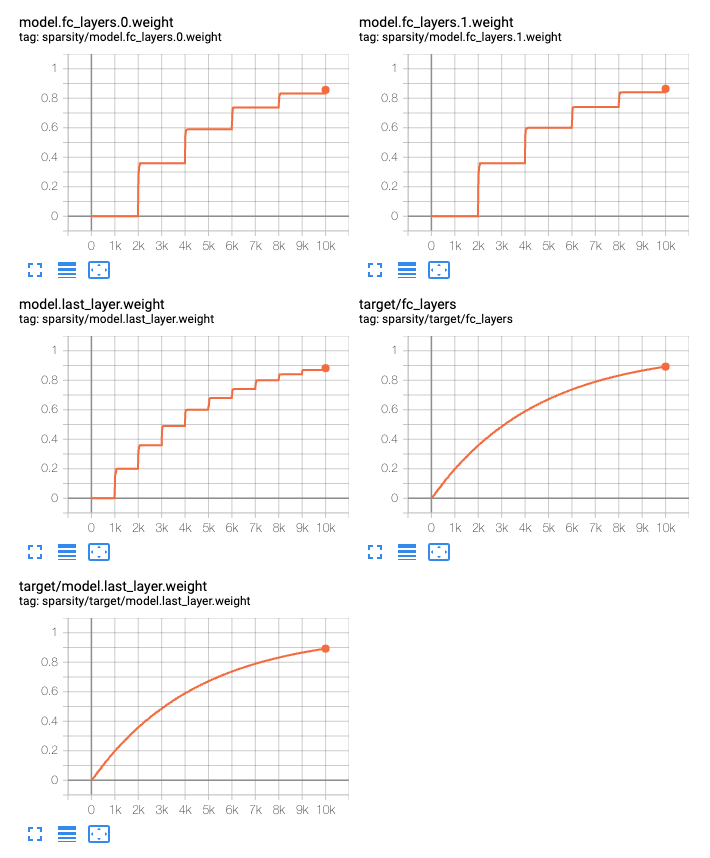
This is expecially useful for [`GMP`](https://training-api.cerebras.ai/en/latest/wsc/api/cerebras_pytorch/sparse.html#cerebras.pytorch.sparse.GMP), where the sparsity level monotonically increases throughout training because a fraction of the remaining elements in the Parameter are pruned at each update step, asymptotically approaching an empty network.
```YAML YAML theme={null}
trainer:
init:
sparsity:
algorithm: "gmp"
update:
freq: 1000
schedule:
type: "exp"
init: 0.0 # starting value
final: 1.0 # asymptotic ending value
# Prune 10% of the remaining connections every 1000 steps
gamma: -0.00010536051 # ln(1-0.10)/1000
```
```Python Python theme={null}
import cerebras.pytorch as cstorch
from cerebras.modelzoo import Trainer
trainer = Trainer(
...,
sparsity=cstorch.sparse.GMP(
sparsity=cstorch.sparse.utils.Exp(
init=0.0, # starting value
final=1.0, # asymptotic ending value
# Prune 10% of the remaining connections every 1000 steps
gamma=-0.00010536051, # ln(1-0.10)/1000
),
update=dict(freq=1000),
),
...,
)
```
#### [`Cosine`](https://training-api.cerebras.ai/en/latest/wsc/api/cerebras_pytorch/sparse.html#cerebras.pytorch.sparse.utils.Cosine)
$$y(\text{step}) = o + a \cdot \cos\left(\text{step} \cdot \pi / \text{half_period}\right),
\quad \text{where} \quad o = \frac{(\text{init} + \text{minimum})}{2} \text{ and } a = \text{init} - o.
$$
This is especially useful for [`RigL`](https://training-api.cerebras.ai/en/latest/wsc/api/cerebras_pytorch/sparse.html#cerebras.pytorch.sparse.RigL), which usually uses a “cosine decay” on its `drop_fraction`. `minimum` defaults to `0.0`. `half_period` controls what step the value reaches its minimum.
```YAML YAML theme={null}
trainer:
init:
sparsity:
algorithm: "rigl"
update:
freq: 1000
sparsity: 0.9
drop_fraction:
type: "cosine"
init: 0.3 # starting value
half_period: 10000 # reaches minimum (default 0) after 10 updates
```
```Python Python theme={null}
import cerebras.pytorch as cstorch
from cerebras.modelzoo import Trainer
trainer = Trainer(
...,
sparsity=cstorch.sparse.RigL(
sparsity=0.9,
update=dict(freq=1000),
drop_fraction=cstorch.sparse.utils.Cosine(
init=0.3 # starting value
half_period=10000, # reaches minimum (default 0) after 10 updates
),
),
...,
)
```
### More Config examples
The most basic configuration, applying random 30% sparsity to all Parameters:
```YAML YAML theme={null}
trainer:
init:
sparsity: 0.3
```
```Python Python theme={null}
import cerebras.pytorch as cstorch
from cerebras.modelzoo import Trainer
trainer = Trainer(
...,
sparsity=cstorch.sparse.Static(sparsity=0.3),
...,
)
```
Apply uniform (static) sparsity to a selected set of weights, with a sparsity pattern guided by the weight magnitudes:
```YAML YAMl theme={null}
trainer:
init:
sparsity:
sparsity: 0.9
init_method: "topk"
param_filter:
- "dense_layer.weight"
- "linear_layer.weight"
```
```Python Python theme={null}
import cerebras.pytorch as cstorch
from cerebras.modelzoo import Trainer
trainer = Trainer(
...,
sparsity=cstorch.sparse.Group(
{
"dense_layer.weight": cstorch.sparse.Static(
sparsity=0.9,
init_method="topk",
),
"linear_layer.weight": cstorch.sparse.Static(
sparsity=0.9,
init_method="topk",
),
}
),
...,
)
```
Basic dynamic sparsity using the SET algorithm. Update the sparsity pattern every 1000 iterations.
```YAML YAML theme={null}
trainer:
init:
algorithm: "set"
sparsity: 0.9
update:
freq: 1000
drop_fraction: 0.3
```
```Python Python theme={null}
import cerebras.pytorch as cstorch
from cerebras.modelzoo import Trainer
trainer = Trainer(
...,
sparsity=cstorch.sparse.Set(
sparsity=0.9,
update=dict(freq=1000),
drop_fraction=0.3,
),
...,
)
```
### Configuring Multiple Sparsity Algorithms
Different groups of Parameters can be sparsified using different sparsity algorithms.
For example, if one set of weights should be statically sparsified to say `0.3`, but another set of weights should be dynamically sparsified using the SET algorithm, it can be done by providing a list of sparsity algorithms.
```YAML YAML theme={null}
trainer:
init:
sparsity:
- param_filter: "fc1.*"
sparsity: 0.3
- param_filter: "fc2.*"
algorithm: "set"
sparsity: 0.9
update:
freq: 1000
drop_fraction: 0.3
```
```Python Python theme={null}
import cerebras.pytorch as cstorch
from cerebras.modelzoo import Trainer
trainer = Trainer(
...,
sparsity=cstorch.sparse.Group(
{
"fc1.*": cstorch.sparse.Static(sparsity=0.3),
"fc2.*": cstorch.sparse.SET(
sparsity=0.9,
update=dict(freq=1000),
drop_fraction=0.3,
),
}
),
...,
)
```
#### Advanced `param_filters`
When each Parameter (or group of Parameters) needs different configuration, `param_filters` can be specified as a dictionary, mapping “patterns” to the config dictionaries to overlay on the default sparsity config options.
For example, when using RigL on transformer networks (uses gradient information to guide which values in a Parameter to prune), sparsity can be cyclically restributed between the heads of attention projection weights in case samples in a batch activate one head disproportionately to another. This ultimately decreases the effectiveness of dynamic sparsity and even can hurt model performance.
To ensure sparsity is fairly distributed between the different attention heads of the multi-head attention projections, you can specify `balance_out_groups` when the *output* logits are logically N independent/stacked groups (i.e. input projection weights before multi-head attention QKV), or `balance_in_groups` for the reverse (i.e. output projection weights). These should apply differently to different weights using `param_filter` since this conceptually only applies to Attention projection weights. In the following example, the model has 12 attention heads.
```YAML YAML theme={null}
rigl_config: &rigl-config
algorithm: "rigl"
sparsity: 0.9
update:
freq: 1000
drop_fraction:
type: "cosine"
init: 0.3
half_period: 10000
trainer:
init:
sparsity:
- <<: *rigl-config
param_filter: "*proj_[qkv]_dense_layer.weight":
balance_out_groups : 12 # ensure this matches model.num_heads
- <<: *rigl-config
param_filter: "*linear_layer.weight":
```
```Python Python theme={null}
rigl_config: &rigl-config
algorithm: "rigl"
sparsity: 0.9
update:
freq: 1000
drop_fraction:
type: "cosine"
init: 0.3
half_period: 10000
trainer:
init:
sparsity:
- <<: *rigl-config
param_filter: "*proj_[qkv]_dense_layer.weight":
balance_out_groups : 12 # ensure this matches model.num_heads
- <<: *rigl-config
param_filter: "*linear_layer.weight":
```
## Running a Sparse Model
No change is needed to the `run` command (see guide: [Launch your job](../../fundamentals/launch-your-job#cs-appliance)) - ensure the `.yaml` file has sparsity enabled. To validate your sparsity config before launching training, run with `--validate_only`. You can also log which weights are being sparsified by passing `--logging VERBOSE` to your run command.
```Bash theme={null}
python modelzoo/path/model/run.py CSX \
--params params_with_sparsity.yaml \
--num_csx=1 \
--model_dir model_dir --mode {train,eval,eval_all,train_and_eval} \
--mount_dirs {paths modelzoo and to data} \
--python_paths {paths to modelzoo and other python code if used}
```
When using dynamic sparsity, you can see realtime summaries by using the [`LogSparsity`](https://training-api.cerebras.ai/en/latest/wsc/Model-zoo/api/generated/cerebras.modelzoo.trainer.callbacks.html#cerebras.modelzoo.trainer.callbacks.LogSparsity) callback.
YAMLPython
```YAML YAML theme={null}
trainer:
init:
sparsity:
...
callbacks:
- LogSparsity: {}
```
```Python Python theme={null}
import cerebras.pytorch as cstorch
from cerebras.modelzoo import Trainer
from cerebras.modelzoo.trainer.callbacks.
trainer = Trainer(
...,
sparsity=...,
callbacks=[LogSparsity()],
...,
)
```
Weight sparse training methods set subsets of weights to zero. The resulting sparse model requires far fewer FLOPs to train and fewer parameters to store, as multiplies with zeros get skipped on both forward and backward passes through the network. Only systems that can accelerate sparsity, such as Cerebras CS-X and CS-3, can take advantage of the lower resource requirement and use the reduction in FLOPs to significantly accelerate training. Finding and training sparse models to match the accuracy of their original “dense” (i.e., non-sparse) configurations is an active and open area of research!
## Configure Sparsity
Let’s expand on the minimal example shown in [sparsity](../../model-zoo/trainer-configuration-overview).
For example, with the following config, the sparsity level is set to 0.3 (30%), and `init_method` is `"random"`, which means 30% of the elements in each Parameter (which passes the [default parameter filter](#sparsity-param-filter)) will be pruned once at model initialization and kept that way throughout training. Non-Parameter tensors are not pruned.
```YAML YAML theme={null}
trainer:
init:
...
sparsity:
algorithm: "static"
sparsity: 0.3
init_method: "random"
...
...
```
```Python Python theme={null}
import cerebras.pytorch as cstorch
from cerebras.modelzoo import Trainer
trainer = Trainer(
...,
sparsity=cstorch.sparse.Static(
sparsity=0.5,
init_method="random",
),
...,
)
...
```
Sparsity is parameterized primarily by the following keys:
* `algorithm`:You can also define a custom class that inherits from [`SparsityAlgorithm`](https://training-api.cerebras.ai/en/latest/wsc/api/cerebras_pytorch/sparse.html#cerebras.pytorch.sparse.SparsityAlgorithm).
* Sparsity training algorithm to apply.
* [`Static`](https://training-api.cerebras.ai/en/latest/wsc/api/cerebras_pytorch/sparse.html#cerebras.pytorch.sparse.Static) (Default): Fixed sparsity level throughout training
* [`GMP`](https://training-api.cerebras.ai/en/latest/wsc/api/cerebras_pytorch/sparse.html#cerebras.pytorch.sparse.GMP): Gradual magnitude pruning
* [`SET`](https://training-api.cerebras.ai/en/latest/wsc/api/cerebras_pytorch/sparse.html#cerebras.pytorch.sparse.SET): Sparse Evolutionary Training
* [`RigL`](https://training-api.cerebras.ai/en/latest/wsc/api/cerebras_pytorch/sparse.html#cerebras.pytorch.sparse.RigL): Rigging the Lottery
```python theme={null}
import cerebras.pytorch as cstorch
class CustomSparsity(cstorch.sparse.SparsityAlgorithm):
...
```
* YAML: As long as the class in the global scope, it can be directly used in a YAML config, e.g.
* Python: The CustomSparsity class can be passed directly to the Trainer as seen below.
```YAML YAML theme={null}
trainer:
init:
sparsity:
algorithm: CustomSparsity
...
```
```Python python theme={null}
from cerebras.modelzoo import Trainer
trainer = Trainer(
...,
sparsity=CustomSparsity(...),
...,
)
```
See Writing a Custom Sparsity Algorithm for more details on how to write a custom sparsity algorithm.
* `sparsity`:The desired sparsity level between 0 and 1. 0.0 means the Parameter is kept fully dense. 1.0 means the Parameter is effectively entirely zeros. Dynamic sparsity algorithms also accept more complex configuration described below in [Dynamic Hyperparameters](#dynamic-hyperparameters).
The actual sparsity level may not match the target sparsity level in practice. The target sparsity level only represents a target distribution. The true sparsity level is determined by the size of the Parameter that is being sparsified.
For example, if you were to sparsify a Parameter with shape (5,) targeting a sparsity level of 0.5, the actual sparsity level will only ever be 0.4. The smaller the Parameter, the more extreme this discrepancy becomes. If the Parameter is a scalar tensor, then the actual sparsity level will always either be 0.0 or 1.0.
* `init_method` optional:Method to compute the initial sparsity distribution.
* [`random`](https://training-api.cerebras.ai/en/latest/wsc/api/cerebras_pytorch/sparse.html#cerebras.pytorch.sparse.init.random): (default) Sparsity is randomly distributed within each weight.
* [`topk`](https://training-api.cerebras.ai/en/latest/wsc/api/cerebras_pytorch/sparse.html#cerebras.pytorch.sparse.init.topk): Sparsity is distributed according to the lowest magnitude weights.
* [`from_zeros`](https://training-api.cerebras.ai/en/latest/wsc/api/cerebras_pytorch/sparse.html#cerebras.pytorch.sparse.init.from_zeros): Sparsity pattern is determined by weight values that are already zero.
* `param_filter` optional:Controls which Parameters are sparsified. The list of Parameter names can be found using `model.named_parameters()`.
When this is omitted, any multidimensional Parameters (except those with `embedding`, `norm`, or `lm_head` in their name) automatically get sparsity applied (single dimensional weights such as biases are ignored) (See [`default_sparse_param_filter`](https://training-api.cerebras.ai/en/latest/wsc/api/cerebras_pytorch/sparse.html#cerebras.pytorch.sparse.configure.default_sparse_param_filter)).While this provides a good default heuristic for transformer based models [1](#conv), a (list of) glob expressions can also be provided to only apply sparsity to Parameters which match, e.g.\`\`\`Bash
trainer:
init:
sparsity:
...
param\_filter:
* "\*dense\_layer.weight"
* "\*linear\_layer.weight"
\`\`\`To match all weights, set `param_filter: *`Per-layer sparsity options can be configured by passing in a list of configuration dictionaries. See below in [advanced param\_filters](#advanced-param-filters).
### Dynamic Sparsity Update Schedule
Dynamic sparsity (e.g. [`GMP`](https://training-api.cerebras.ai/en/latest/wsc/api/cerebras_pytorch/sparse.html#cerebras.pytorch.sparse.GMP), [`SET`](https://training-api.cerebras.ai/en/latest/wsc/api/cerebras_pytorch/sparse.html#cerebras.pytorch.sparse.SET), or [`RigL`](https://training-api.cerebras.ai/en/latest/wsc/api/cerebras_pytorch/sparse.html#cerebras.pytorch.sparse.RigL)) needs an additional `update` schedule indicating when to update the sparsity pattern. There are 2 basic methods built-in with 3 different options:
#### Regular Interval
When sparsity should be updated at a regular interval, a single frequency can be given:
```YAML YAML theme={null}
trainer:
init:
sparsity:
update:
freq: 100
algorithm: set
sparsity: 0.9
```
```Python Python theme={null}
import cerebras.pytorch as cstorch
from cerebras.modelzoo import Trainer
trainer = Trainer(
...,
sparsity=cstorch.sparse.SET(
sparsity=0.9,
update=dict(freq=100),
),
...,
)
```
Here, sparsity will be initialized at 90% and steps 0,…,99 will be performed with a fixed sparsity pattern. Every 100 steps, the sparsity pattern will be updated according to the SET algorithm.
To control beginning and ending steps, use a dictionary. In the following example, sparsity will be initialized at 0% and steps 0,…,76 will be performed without sparsity. Starting from step 77 and every 100 steps until step 377, the sparsity pattern will be updated according to the SET algorithm. After step 377, the sparsity pattern will continue to be applied, but it will no longer be updated (stop is exclusive).
```YAML YAML theme={null}
trainer:
init:
sparsity:
update:
start: 77
freq: 100
stop: 477 # An update will _not_ be performed on step 477
algorithm: set
sparsity: 0.9
```
```Python theme={null}
import cerebras.pytorch as cstorch
from cerebras.modelzoo import Trainer
trainer = Trainer(
...,
sparsity=cstorch.sparse.SET(
sparsity=0.9,
update=dict(
start=77,
freq=100,
stop=477, # An update will _not_ be performed on step 477
),
),
...,
)
```
#### Irregular Interval
When sparsity should be updated at arbitrary steps, specify them in a list:
```YAML YAML theme={null}
trainer:
init:
sparsity:
update:
steps: [0, 5, 20, 50]
algorithm: set
sparsity: 0.9
```
```Python Python theme={null}
import cerebras.pytorch as cstorch
from cerebras.modelzoo import Trainer
trainer = Trainer(
...,
sparsity=cstorch.sparse.SET(
sparsity=0.9,
update=dict(
steps=[0, 5, 20, 50],
),
),
...,
)
```
### Dynamic Hyperparameters
Dynamic sparsity algorithms (e.g. [`GMP`](https://training-api.cerebras.ai/en/latest/wsc/api/cerebras_pytorch/sparse.html#cerebras.pytorch.sparse.GMP), [`SET`](https://training-api.cerebras.ai/en/latest/wsc/api/cerebras_pytorch/sparse.html#cerebras.pytorch.sparse.SET), or [`RigL`](https://training-api.cerebras.ai/en/latest/wsc/api/cerebras_pytorch/sparse.html#cerebras.pytorch.sparse.RigL)) can configure the `sparsity` (and `drop_fraction` for [`SET`](https://training-api.cerebras.ai/en/latest/wsc/api/cerebras_pytorch/sparse.html#cerebras.pytorch.sparse.SET) and [`RigL`](https://training-api.cerebras.ai/en/latest/wsc/api/cerebras_pytorch/sparse.html#cerebras.pytorch.sparse.RigL)) field using a “step aware hyperparemeter” akin to learning rate schedules in addition to simple constants. These more complex configurations usually require additional options and so are specified as dictionaries.
Note
The base [`DynamicSparsityAlgorithm`](https://training-api.cerebras.ai/en/latest/wsc/api/cerebras_pytorch/sparse.html#cerebras.pytorch.sparse.DynamicSparsityAlgorithm) that invokes such a dynamic hyperparameter for `sparsity` ensures sparsity levels stay legal by using `torch.clamp(sparsity, min=0.0, max=1.0)`.
#### [`Linear`](https://training-api.cerebras.ai/en/latest/wsc/api/cerebras_pytorch/sparse.html#cerebras.pytorch.sparse.utils.Linear)
$$
y(\text{step}) = \text{init} + \text{slope} \cdot \text{step}
$$
```YAML YAML theme={null}
trainer:
init:
sparsity:
algorithm: "gmp"
update:
freq: 1000
schedule:
type: "linear"
init: 0.0 # value at step zero
slope: 0.001 # increase in value each step
```
```Python Python theme={null}
import cerebras.pytorch as cstorch
from cerebras.modelzoo import Trainer
trainer = Trainer(
...,
sparsity=cstorch.sparse.GMP(
sparsity=cstorch.sparse.utils.Linear(
init=0.0, # value at step zero
slope: 0.001, # increase in value each step
),
update=dict(freq=1000),
),
...,
)
```
#### [`Exponential`](https://training-api.cerebras.ai/en/latest/wsc/api/cerebras_pytorch/sparse.html#cerebras.pytorch.sparse.utils.Exp)
$y(\text{step}) = \text{final} + (\text{init} - \text{final}) e^{(\text{step} - \text{gamma})}$
This is expecially useful for [`GMP`](https://training-api.cerebras.ai/en/latest/wsc/api/cerebras_pytorch/sparse.html#cerebras.pytorch.sparse.GMP), where the sparsity level monotonically increases throughout training because a fraction of the remaining elements in the Parameter are pruned at each update step, asymptotically approaching an empty network.
```YAML YAML theme={null}
trainer:
init:
sparsity:
algorithm: "gmp"
update:
freq: 1000
schedule:
type: "exp"
init: 0.0 # starting value
final: 1.0 # asymptotic ending value
# Prune 10% of the remaining connections every 1000 steps
gamma: -0.00010536051 # ln(1-0.10)/1000
```
```Python Python theme={null}
import cerebras.pytorch as cstorch
from cerebras.modelzoo import Trainer
trainer = Trainer(
...,
sparsity=cstorch.sparse.GMP(
sparsity=cstorch.sparse.utils.Exp(
init=0.0, # starting value
final=1.0, # asymptotic ending value
# Prune 10% of the remaining connections every 1000 steps
gamma=-0.00010536051, # ln(1-0.10)/1000
),
update=dict(freq=1000),
),
...,
)
```
#### [`Cosine`](https://training-api.cerebras.ai/en/latest/wsc/api/cerebras_pytorch/sparse.html#cerebras.pytorch.sparse.utils.Cosine)
$$y(\text{step}) = o + a \cdot \cos\left(\text{step} \cdot \pi / \text{half_period}\right),
\quad \text{where} \quad o = \frac{(\text{init} + \text{minimum})}{2} \text{ and } a = \text{init} - o.
$$
This is especially useful for [`RigL`](https://training-api.cerebras.ai/en/latest/wsc/api/cerebras_pytorch/sparse.html#cerebras.pytorch.sparse.RigL), which usually uses a “cosine decay” on its `drop_fraction`. `minimum` defaults to `0.0`. `half_period` controls what step the value reaches its minimum.
```YAML YAML theme={null}
trainer:
init:
sparsity:
algorithm: "rigl"
update:
freq: 1000
sparsity: 0.9
drop_fraction:
type: "cosine"
init: 0.3 # starting value
half_period: 10000 # reaches minimum (default 0) after 10 updates
```
```Python Python theme={null}
import cerebras.pytorch as cstorch
from cerebras.modelzoo import Trainer
trainer = Trainer(
...,
sparsity=cstorch.sparse.RigL(
sparsity=0.9,
update=dict(freq=1000),
drop_fraction=cstorch.sparse.utils.Cosine(
init=0.3 # starting value
half_period=10000, # reaches minimum (default 0) after 10 updates
),
),
...,
)
```
### More Config examples
The most basic configuration, applying random 30% sparsity to all Parameters:
```YAML YAML theme={null}
trainer:
init:
sparsity: 0.3
```
```Python Python theme={null}
import cerebras.pytorch as cstorch
from cerebras.modelzoo import Trainer
trainer = Trainer(
...,
sparsity=cstorch.sparse.Static(sparsity=0.3),
...,
)
```
Apply uniform (static) sparsity to a selected set of weights, with a sparsity pattern guided by the weight magnitudes:
```YAML YAMl theme={null}
trainer:
init:
sparsity:
sparsity: 0.9
init_method: "topk"
param_filter:
- "dense_layer.weight"
- "linear_layer.weight"
```
```Python Python theme={null}
import cerebras.pytorch as cstorch
from cerebras.modelzoo import Trainer
trainer = Trainer(
...,
sparsity=cstorch.sparse.Group(
{
"dense_layer.weight": cstorch.sparse.Static(
sparsity=0.9,
init_method="topk",
),
"linear_layer.weight": cstorch.sparse.Static(
sparsity=0.9,
init_method="topk",
),
}
),
...,
)
```
Basic dynamic sparsity using the SET algorithm. Update the sparsity pattern every 1000 iterations.
```YAML YAML theme={null}
trainer:
init:
algorithm: "set"
sparsity: 0.9
update:
freq: 1000
drop_fraction: 0.3
```
```Python Python theme={null}
import cerebras.pytorch as cstorch
from cerebras.modelzoo import Trainer
trainer = Trainer(
...,
sparsity=cstorch.sparse.Set(
sparsity=0.9,
update=dict(freq=1000),
drop_fraction=0.3,
),
...,
)
```
### Configuring Multiple Sparsity Algorithms
Different groups of Parameters can be sparsified using different sparsity algorithms.
For example, if one set of weights should be statically sparsified to say `0.3`, but another set of weights should be dynamically sparsified using the SET algorithm, it can be done by providing a list of sparsity algorithms.
```YAML YAML theme={null}
trainer:
init:
sparsity:
- param_filter: "fc1.*"
sparsity: 0.3
- param_filter: "fc2.*"
algorithm: "set"
sparsity: 0.9
update:
freq: 1000
drop_fraction: 0.3
```
```Python Python theme={null}
import cerebras.pytorch as cstorch
from cerebras.modelzoo import Trainer
trainer = Trainer(
...,
sparsity=cstorch.sparse.Group(
{
"fc1.*": cstorch.sparse.Static(sparsity=0.3),
"fc2.*": cstorch.sparse.SET(
sparsity=0.9,
update=dict(freq=1000),
drop_fraction=0.3,
),
}
),
...,
)
```
#### Advanced `param_filters`
When each Parameter (or group of Parameters) needs different configuration, `param_filters` can be specified as a dictionary, mapping “patterns” to the config dictionaries to overlay on the default sparsity config options.
For example, when using RigL on transformer networks (uses gradient information to guide which values in a Parameter to prune), sparsity can be cyclically restributed between the heads of attention projection weights in case samples in a batch activate one head disproportionately to another. This ultimately decreases the effectiveness of dynamic sparsity and even can hurt model performance.
To ensure sparsity is fairly distributed between the different attention heads of the multi-head attention projections, you can specify `balance_out_groups` when the *output* logits are logically N independent/stacked groups (i.e. input projection weights before multi-head attention QKV), or `balance_in_groups` for the reverse (i.e. output projection weights). These should apply differently to different weights using `param_filter` since this conceptually only applies to Attention projection weights. In the following example, the model has 12 attention heads.
```YAML YAML theme={null}
rigl_config: &rigl-config
algorithm: "rigl"
sparsity: 0.9
update:
freq: 1000
drop_fraction:
type: "cosine"
init: 0.3
half_period: 10000
trainer:
init:
sparsity:
- <<: *rigl-config
param_filter: "*proj_[qkv]_dense_layer.weight":
balance_out_groups : 12 # ensure this matches model.num_heads
- <<: *rigl-config
param_filter: "*linear_layer.weight":
```
```Python Python theme={null}
rigl_config: &rigl-config
algorithm: "rigl"
sparsity: 0.9
update:
freq: 1000
drop_fraction:
type: "cosine"
init: 0.3
half_period: 10000
trainer:
init:
sparsity:
- <<: *rigl-config
param_filter: "*proj_[qkv]_dense_layer.weight":
balance_out_groups : 12 # ensure this matches model.num_heads
- <<: *rigl-config
param_filter: "*linear_layer.weight":
```
## Running a Sparse Model
No change is needed to the `run` command (see guide: [Launch your job](../../fundamentals/launch-your-job#cs-appliance)) - ensure the `.yaml` file has sparsity enabled. To validate your sparsity config before launching training, run with `--validate_only`. You can also log which weights are being sparsified by passing `--logging VERBOSE` to your run command.
```Bash theme={null}
python modelzoo/path/model/run.py CSX \
--params params_with_sparsity.yaml \
--num_csx=1 \
--model_dir model_dir --mode {train,eval,eval_all,train_and_eval} \
--mount_dirs {paths modelzoo and to data} \
--python_paths {paths to modelzoo and other python code if used}
```
When using dynamic sparsity, you can see realtime summaries by using the [`LogSparsity`](https://training-api.cerebras.ai/en/latest/wsc/Model-zoo/api/generated/cerebras.modelzoo.trainer.callbacks.html#cerebras.modelzoo.trainer.callbacks.LogSparsity) callback.
YAMLPython
```YAML YAML theme={null}
trainer:
init:
sparsity:
...
callbacks:
- LogSparsity: {}
```
```Python Python theme={null}
import cerebras.pytorch as cstorch
from cerebras.modelzoo import Trainer
from cerebras.modelzoo.trainer.callbacks.
trainer = Trainer(
...,
sparsity=...,
callbacks=[LogSparsity()],
...,
)
```
 ## Sparsity via API
Please see [Sparsifying models](../../model-zoo/tutorials/train-a-model-with-weight-sparsity#sparsity-api) for more details on how to configure sparsity using the Cerebras PyTorch API.
## Related research
Sparsity is a powerful tool that can improve performance, reduce the model size, and help [generalizability](https://openreview.net/forum?id=SYuJXrXq8tw) while achieving the same accuracy as densely trained models. Read some of our research work on training with sparsity here:
1. Sparse pre-training and dense fine-tuning (SPDF): [blog](https://www.cerebras.net/blog/accelerating-large-gpt-training-with-sparse-pre-training-and-dense-fine-tuning/), [arxiv](https://arxiv.org/abs/2303.10464/), [PMLR](https://proceedings.mlr.press/v216/thangarasa23a.html). This work shows how we can pre-train a 1.3B parameter GPT-3 style model with up to 75% unstructured sparsity and 60% fewer training FLOPs on Cerebras CS-X, without significantly losing accuracy on downstream tasks.
## Sparsity via API
Please see [Sparsifying models](../../model-zoo/tutorials/train-a-model-with-weight-sparsity#sparsity-api) for more details on how to configure sparsity using the Cerebras PyTorch API.
## Related research
Sparsity is a powerful tool that can improve performance, reduce the model size, and help [generalizability](https://openreview.net/forum?id=SYuJXrXq8tw) while achieving the same accuracy as densely trained models. Read some of our research work on training with sparsity here:
1. Sparse pre-training and dense fine-tuning (SPDF): [blog](https://www.cerebras.net/blog/accelerating-large-gpt-training-with-sparse-pre-training-and-dense-fine-tuning/), [arxiv](https://arxiv.org/abs/2303.10464/), [PMLR](https://proceedings.mlr.press/v216/thangarasa23a.html). This work shows how we can pre-train a 1.3B parameter GPT-3 style model with up to 75% unstructured sparsity and 60% fewer training FLOPs on Cerebras CS-X, without significantly losing accuracy on downstream tasks.
 1. Sparse Iso-FLOP transformations for Maximizing Training Efficiency (Sparse-IFT): [blog](https://www.cerebras.net/blog/can-sparsity-make-ai-models-more-accurate), [arxiv](https://arxiv.org/abs/2303.11525). This work shows how pre-training a GPT-3 style small model with sparsity leads to a 0.4 perplexity improvement on the WikiText103 language modeling task. See the table below and paper for more details, including results on computer vision tasks.
 1. Variable Sparse pre-training and dense fine-tuning (Variable SPDF): [blog](https://www.cerebras.net/blog/accelerating-llm-training-with-variable-sparse-pre-training-and-dense-fine-tuning/?utm_content=258048089\&utm_medium=social\&utm_source=linkedin\&hss_channel=lcp-10858000). This work extends SPDF, demonstrating the scaling up to a 6.7B GPT-3 style model with a 64% FLOPs reduction while maintaining downstream model performance. This is accomplished by performing the majority of pre-training at static sparsity, then finishing pre-training on a dense version of the model before fine-tuning on the dense version as well.
 ## Footnotes
Sparsity on CSX has not yet been thoroughly validated with convolutional networks.
## Footnotes
Sparsity on CSX has not yet been thoroughly validated with convolutional networks.