

From version 2.2 onwards, the Model Zoo has been reorganized to enhance clarity and usability. If you’ve upgraded from any version prior to 2.2, see Directory Path Updates for more info.
Included Models
The Cerebras Model Zoo includes various models:
To deploy your neural network jobs on the Cerebras Wafer-Scale Cluster, refer to the Quick start guide. This guide will walk you through the necessary steps to compile, validate, and train models from this Model Zoo using your preferred framework.
Model Portability
The Cerebras Model Zoo facilitates model portability, providing tools that aid users in adapting existing models or crafting new ones using Cerebras APIs. This includes a spectrum of user stages, from beginners to advanced users, with varying levels of integration and customization:Beginners
Start with Cerebras data preprocessing tools and use model implementations found in the Cerebras Model Zoo.Intermediate Users
Intermediate users can integrate their data preprocessing methods by referring to the section Create your own data preprocessing.Advanced Users
Define your PyTorch model or code using therun function in the Cerebras Model Zoo and Supported Operations API.
Structure
The Model Zoo is designed to be user-friendly, offering an organized array of models, datasets, tools, and utilities. Key features include:- Reorganized models and datasets categorized by classes (NLP, Vision, Multimodal).
- Registry APIs that enable querying of paths and supported combinations for each model.
- Config classes designed to encapsulate parameters in YAML files, providing a clear class hierarchy and ensuring the validation of configurations used with models.
- Enhanced data preprocessing tools for NLP models, significantly improving performance.
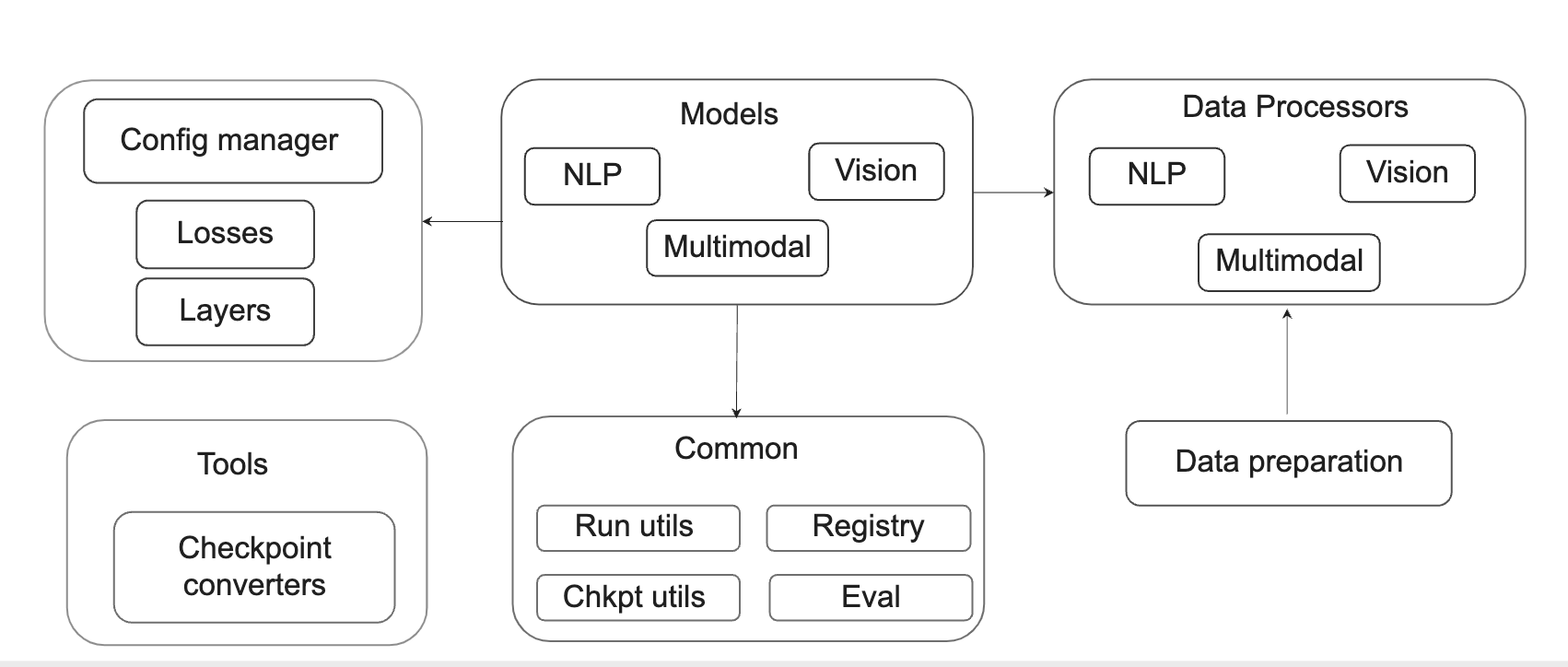
Fig. 7 Cerebras Model Zoo structure
Modules
The principal modules in the Cerebras Model Zoo include:
This redesign aims to streamline the user experience, making it easier for ML developers and researchers to explore, experiment, and develop solutions efficiently within the Cerebras ecosystem. The documentation further enriches this experience, offering examples and guidance on utilizing the Model Zoo’s Registry APIs and Config Classes, thereby enhancing the model development and deployment process.