In this guide, you’ll be pretraining a LLaMA3 8B model. By the end, you should be comfortable kicking off your own pretraining run for the model of your choice.

Prerequisites

Before beginning this guide, make sure you’ve:

Configure the Run

This page will cover the two main flows you can employ to perform pretraining. One using a YAML configuration file and a training script that is packaged in the Cerebras ModelZoo. The other using pure Python to run on your own. They will be presented side-by-side so that you can compare the two flows as you progress through this tutorial. If you aren’t interested in seeing the break down of the configuration, you can skip ahead to the Putting It All Together section to see the full configuration.

Configure the Wafer-Scale Cluster

Let’s first figure out how much resources you’ll want to use for this pretraining job. In this example, let’s use a 16 node Wafer-Scale Cluster. To configure this, you can specify the number of Cerebras systems to use.
trainer:
  init:
    backend:
      backend_type: CSX
      cluster_config:
        num_csx: 16

import cerebras.pytorch as cstorch
from cerebras.modelzoo import Trainer

trainer = Trainer(
    backend=cstorch.backend(
        backend_type="CSX",
        cluster_config=cstorch.distributed.ClusterConfig(
            num_csx=16,
        ),
    ),
    ...,
)
...

Notice how you can change cluster configuration parameters like num_csx to scale the run without making any changes to the model itself.

Configure the Model

Here you will be pretraining the LLaMA3 model class that comes packaged inside of the Cerebras ModelZoo. The LLaMA3 model by default will compute the accuracy and perplexity metrics during upstream validation.
  • YAML: To configure the LLaMA3 8B model, you specify the following parameters to the model key.
  • Python: To configure the LLaMA3 8B model, you construct the model inside a lambda to take advantage of the Trainer’s efficient weight initialization feature. LLaMA3 is just a configuration of GPT2, hence why you are importing and initializing a Gpt2Model class.
trainer:
  init:
    backend:  # CSX
      ...
    model:
      # Embedding
      vocab_size: 128256
      hidden_size: 4096
      position_embedding_type: "rotary"
      pos_scaling_factor: 1.0
      rope_theta: 500000.0
      rotary_dim: 128
      share_embedding_weights: false
      max_position_embeddings: 8192
      embedding_dropout_rate: 0.0
      embedding_layer_norm: false

      # Decoder
      num_hidden_layers: 32
      dropout_rate: 0.0
      layer_norm_epsilon: 1.0e-5
      norm_type: "rmsnorm"

      # Decoder - Attention
      num_heads: 32
      attention_type: "scaled_dot_product"
      attention_module: "multiquery_attention"
      attention_dropout_rate: 0.0
      use_projection_bias_in_attention: false
      use_ffn_bias_in_attention: false
      extra_attention_params:
          num_kv_groups: 8

      # Decoder - ffn
      filter_size: 14336
      nonlinearity: "swiglu"
      use_ffn_bias: false

      # Task-specific
      use_bias_in_output: false
      loss_scaling: "num_tokens"
      loss_weight: 1.0

      # Initializer
      initializer_range: 0.02

      # Cerebras parameters
      mixed_precision: True
      fp16_type: "cbfloat16"
    ...

import cerebras.pytorch as cstorch
from cerebras.modelzoo import Trainer
from cerebras.modelzoo.models.nlp.gpt2.model import Gpt2Model as LLaMA3

trainer = Trainer(
    backend=cstorch.backend("CSX", ...),
    model=lambda: LLaMA3(
        # Embedding
        vocab_size=128256,
        hidden_size=4096,
        position_embedding_type="rotary",
        pos_scaling_factor=1.0,
        rope_theta=500000.0,
        rotary_dim=128,
        share_embedding_weights=False,
        max_position_embeddings=8192,
        embedding_dropout_rate=0.0,
        embedding_layer_norm=False,

        # Decoder
        num_hidden_layers=32,
        dropout_rate=0.0,
        layer_norm_epsilon=1.0e-5,
        norm_type="rmsnorm",

        # Decoder - Attention
        num_heads=32,
        attention_type="scaled_dot_product",
        attention_module="multiquery_attention",
        attention_dropout_rate=0.0,
        use_projection_bias_in_attention=False,
        use_ffn_bias_in_attention=False,
        extra_attention_params=dict(
            num_kv_groups=8,
        ),

        # Decoder - ffn
        filter_size=14336,
        nonlinearity="swiglu",
        use_ffn_bias=False,

        # Task-specific
        use_bias_in_output=False,
        loss_scaling="num_tokens",
        loss_weight=1.0,

        # Initializer
        initializer_range=0.02,

        # Cerebras parameters
        mixed_precision=True,
        fp16_type="cbfloat16",
    ),
    ...,
)
...

Configure the Optimizer

Here you will be using the AdamW optimizer to optimize our model during pretraining.
  • YAML: To configure the AdamW key. Note, you don’t specify a learning rate here as you will configure a learning rate scheduler, just below.
  • Python: Note, you specified a placeholder learning rate of 0.01 here as you will configure a learning rate scheduler, just below.
trainer:
  init:
    backend:  # CSX
      ...
    model:  # llama
      ...
    optimizer:
      AdamW:
        betas: [0.9, 0.95]
        correct_bias: True
        weight_decay: 0.1
To configure the [`AdamW`](../cs-torch/cerebras-pytorch-api/cerebras-pytorch-optim) optimizer, you can construct it as follows.

import cerebras.pytorch as cstorch
from cerebras.modelzoo import Trainer
from cerebras.modelzoo.models.nlp.gpt2.model import Gpt2Model as LLaMA3

trainer = Trainer(
    backend=cstorch.backend("CSX", ...),
    model=lambda: LLaMA3(...),
    optimizer=lambda model: cstorch.optim.AdamW(
        model.parameters(),
        lr=0.01,  # This is a placeholder
        betas=[0.9, 0.95],
        correct_bias=True,
        weight_decay: 0.1,
    ),
    ...,
)
...

Configure a Learning Rate Scheduler

Here you will be using a CosineDecayLR learning rate scheduler. To configure the CosineDecayLR key.
trainer:
  init:
    backend:  # CSX
      ...
    model:  # llama
      ...
    optimizer:  # AdamW
      ...
    schedulers:
    - CosineDecayLR:
        initial_learning_rate: 3.0e-5
        end_learning_rate: 3.0e-6
        total_iters: 528

import cerebras.pytorch as cstorch
from cerebras.modelzoo import Trainer
from cerebras.modelzoo.models.nlp.gpt2.model import Gpt2Model as LLaMA3

trainer = Trainer(
    backend=cstorch.backend("CSX", ...),
    model=lambda: LLaMA3(...),
    optimizer=lambda model: cstorch.optim.AdamW(...),
    schedulers=[
        lambda optimizer: cstorch.optim.lr_scheduler.CosineDecayLR(
            initial_learning_rate=3.0e-5,
            end_learning_rate=3.0e-6,
            total_iters=528,
        ),
    ],
    ...,
)
...

Configure Mixed Precision and Gradient Scaling

To get better performance, let’s use mixed precision in the run. More specifically, let’s configure the cluster to use cbfloat16 as the lower precision type (see CB16 Half-Precision for more details on the cbfloat16 data format). Since a lower precision is being used for activations, you’ll want to scale the gradients to prevent underflowing. Let’s use dynamic loss scaling for this run. In addition, to prevent gradients from exploding, let’s also clip the gradients based on its norm.
  • YAML: To configure the precision type and gradient scaling, you can specify the following parameters to the precision key.
  • Python: To configure the precision type and gradient scaling, you can construct a MixedPrecision object as follows.
trainer:
  init:
    backend:  # CSX
      ...
    model:  # llama
      ...
    optimizer:  # AdamW
      ...
    schedulers:  # CosineDecayLR
      ...
    precision:
      fp16_type: cbfloat16
      loss_scaling_factor: dynamic
      max_gradient_norm: 1.0

import cerebras.pytorch as cstorch
from cerebras.modelzoo import Trainer
from cerebras.modelzoo.trainer.callbacks import MixedPrecision
from cerebras.modelzoo.models.nlp.gpt2.model import Gpt2Model as LLaMA3

trainer = Trainer(
    backend=cstorch.backend("CSX", ...),
    model=lambda: LLaMA3(...),
    optimizer=lambda model: cstorch.optim.AdamW(...),
    schedulers=[...],
    precision=MixedPrecision(
        fp16_type="cbfloat16",
        loss_scaling_factor="dynamic",
        max_gradient_norm=1.0,
    ),
    ...,
)
...

Configure the Training/Validation Loop

For this tutorial, let’s pre-train the model for 10k steps and run validation every 1k steps.
  • YAML: To configure the number of training and validation steps you can specify the following parameters to the loop key.
  • Python: To configure the number of training and validation steps, you can construct a TrainingLoop object as follows.
trainer:
  init:
    backend:  # CSX
      ...
    model:  # llama
      ...
    optimizer:  # AdamW
      ...
    schedulers:  # CosineDecayLR
      ...
    precision:  # DLS
      ...
    loop:
      num_steps: 10000
      eval_frequency: 1000
      eval_steps: 1000

import cerebras.pytorch as cstorch
from cerebras.modelzoo import Trainer
from cerebras.modelzoo.trainer.callbacks import MixedPrecision, TrainingLoop
from cerebras.modelzoo.models.nlp.gpt2.model import Gpt2Model as LLaMA3

trainer = Trainer(
    backend=cstorch.backend("CSX", ...),
    model=lambda: LLaMA3(...),
    optimizer=lambda model: cstorch.optim.AdamW(...),
    schedulers=[...],
    precision=MixedPrecision(...),
    loop=TrainingLoop(
      num_steps=10000,
      eval_frequency=1000,
      eval_steps=1000,
    ),
    ...,
)
...

Configure Checkpointing

In case you want to restart training from some point in the middle with different hyperparameters, let’s save a checkpoint every 1000 steps of training. This conveniently lines up nicely with the validation frequency you specified above so that you’ll know how well the model was performing at each checkpoint.
  • YAML: To configure how often checkpoints are taken, you specify the following parameters to the checkpoint key.
  • Python: To configure how often checkpoints are taken, you can construct a Checkpoint object as follows.
trainer:
  init:
  backend:  \# CSX
  ...
  model:  \# llama
  ...
  optimizer:  \# AdamW
  ...
  schedulers:  \# CosineDecayLR
  ...
  precision:  \# DLS
  ...
  loop:
  ...
  checkpoint:
  steps:  1000

import cerebras.pytorch as cstorch
from cerebras.modelzoo import Trainer
from cerebras.modelzoo.trainer.callbacks import (
    Checkpoint,
    MixedPrecision,
    TrainingLoop,
)
from cerebras.modelzoo.models.nlp.gpt2.model import Gpt2Model as LLaMA3

trainer = Trainer(
    backend=cstorch.backend("CSX", ...),
    model=lambda: LLaMA3(...),
    optimizer=lambda model: cstorch.optim.AdamW(...),
    schedulers=\[...\],
    precision=MixedPrecision(...),
    loop=TrainingLoop(...),
    checkpoint=Checkpoint(steps=1000),
    ...,
)
...

Configure Callbacks

The following steps are completely optional. For this pretraining run, let’s keep track of the gradient norms to make sure that the model numerics are stable. In addition, let’s ensure that the loss values that the model is outputting are valid (i.e. not NaN or inf). Finally, since upstream validation is being run, let’s make sure that the validation metrics that are computed are being logged.
  • YAML: To configure these checks, you can specify the following callbacks to the callbacks key.
  • Python: To configure these checks, you can construct the following callbacks and pass them to the trainer.
trainer:
  init:
    backend:  # CSX
      ...
    model:  # llama
      ...
    optimizer:  # AdamW
      ...
    schedulers:  # CosineDecayLR
      ...
    precision:  # DLS
      ...
    loop:
      ...
    checkpoint:
      ...
    callbacks:
    - ComputeNorm: {}
    - CheckLoss: {}
    - ModelEvalMetrics: {}

import cerebras.pytorch as cstorch
from cerebras.modelzoo import Trainer
from cerebras.modelzoo.trainer.callbacks import (
    CheckLoss,
    Checkpoint,
    ComputeNorm,
    MixedPrecision,
    ModelEvalMetrics,
    TrainingLoop,
)
from cerebras.modelzoo.models.nlp.gpt2.model import Gpt2Model as LLaMA3

trainer = Trainer(
    backend=cstorch.backend("CSX", ...),
    model=lambda: LLaMA3(...),
    optimizer=lambda model: cstorch.optim.AdamW(...),
    schedulers=[...],
    precision=MixedPrecision(...),
    loop=TrainingLoop(...),
    checkpoint=Checkpoint(...),
    callbacks=[
        ComputeNorm(),
        CheckLoss(),
        ModelEvalMetrics(),
    ],
)

...

Configure Loggers

To keep track of the progress of our run, let’s also employ the use of the progress logger as well as the TensorBoard logger.
  • YAML: To configure these loggers, you can specify the following to the loggers key.
  • Python: To configure these loggers, you can construct the following and pass them to the trainer.
trainer:
  init:
    backend:  # CSX
      ...
    model:  # llama
      ...
    optimizer:  # AdamW
      ...
    schedulers:  # CosineDecayLR
      ...
    precision:  # DLS
      ...
    loop:
      ...
    checkpoint:
      ...
    callbacks:
      ...
    loggers:
    - ProgressLogger: {}
    - TensorBoardLogger: {}

import cerebras.pytorch as cstorch
from cerebras.modelzoo import Trainer
from cerebras.modelzoo.trainer.callbacks import (
    Checkpoint,
    MixedPrecision,
    TrainingLoop,
)
from cerebras.modelzoo.trainer.loggers import (
      ProgessLogger,
      TensorBoardLogger,
)
from cerebras.modelzoo.models.nlp.gpt2.model import Gpt2Model as LLaMA3

trainer = Trainer(
    backend=cstorch.backend("CSX", ...),
    model=lambda: LLaMA3(...),
    optimizer=lambda model: cstorch.optim.AdamW(...),
    schedulers=[...],
    precision=MixedPrecision(...),
    loop=TrainingLoop(...),
    checkpoint=Checkpoint(...),
    callbacks=[...],
    loggers=[
        ProgessLogger(),
        TensorBoardLogger(),
    ],
)
...

Reproducibility

In order to make the pretraining run reproducible, you must set the Trainer’s seed.
  • YAML: You can do this by specifying the [seed](/model-zoo/trainer-configuration-overview key.
  • Python: You can do this by specifying the seed argument to the Trainer’s constructor as follows.
trainer:
  init:
    backend:  # CSX
      ...
    model:  # llama
      ...
    optimizer:  # AdamW
      ...
    schedulers:  # CosineDecayLR
      ...
    precision:  # DLS
      ...
    loop:
      ...
    checkpoint:
      ...
    callbacks:
      ...
    loggers:
      ...
    seed: 2024
    ...

import cerebras.pytorch as cstorch
from cerebras.modelzoo import Trainer
from cerebras.modelzoo.trainer.callbacks import (
    Checkpoint,
    MixedPrecision,
    TrainingLoop,
)
from cerebras.modelzoo.trainer.loggers import (
      ProgessLogger,
      TensorBoardLogger,
)
from cerebras.modelzoo.models.nlp.gpt2.model import Gpt2Model as LLaMA3


trainer = Trainer(
    backend=cstorch.backend("CSX", ...),
    model=lambda: LLaMA3(...),
    optimizer=lambda model: cstorch.optim.AdamW(...),
    schedulers=[...],
    precision=MixedPrecision(...),
    loop=TrainingLoop(...),
    checkpoint=Checkpoint(...),
    callbacks=[...],
    loggers=[...],
    seed=2024,
)
...

Setting different seeds across different runs of the same model may cause multiple compiles.

Configure Dataloaders

Now that you’ve constructed the Trainer object, you’re almost ready to start the pretraining run. One of the only things left to do is to configure the training and validation dataloaders you’ll be using.
  • YAML: To configure the training and validation dataloaders, you can specify the following to the [train_dataloader](/model-zoo/trainer-configuration-overview key).
  • Python: To configure the training and validation dataloaders, you can construct DataLoader objects and pass them into the Trainer’s fit method as follows.
trainer:
  init:
    ...
  fit:
    train_dataloader:
      data_processor: GptHDF5MapDataProcessor
      data_dir: "/data/llama_v3_dataset_vocab128256/train"
      batch_size: 80
      shuffle: False
      shuffle_seed: 1337
      num_workers: 8
      prefetch_factor: 10
      persistent_workers: True # Important to avoid seeding at each epoch
    val_dataloader:
    - data_processor: GptHDF5MapDataProcessor
      data_dir: "/data/llama_v3_dataset_vocab128256/val"
      batch_size: 80
      shuffle: False
      shuffle_seed: 1337
      num_workers: 8
      prefetch_factor: 10
      persistent_workers: True # Important to avoid seeding at each epoch

import cerebras.pytorch as cstorch
from cerebras.modelzoo import Trainer

trainer = Trainer(...)
trainer.fit(
    train_dataloader=cstorch.utils.data.DataLoader(
        registry.get_data_processor("GptHDF5MapDataProcessor"),
        data_dir="/data/llama_v3_dataset_vocab128256/train",
        batch_size=80,
        shuffle=False,
        shuffle_seed=1337,
        num_workers=8,
        prefetch_factor=10,
        persistent_workers=True, # Important to avoid seeding at each epoch
    ),
    val_dataloader=[
        cstorch.utils.data.DataLoader(
            registry.get_data_processor("GptHDF5MapDataProcessor"),
            data_dir="/data/llama_v3_dataset_vocab128256/val",
            batch_size=80,
            shuffle=False,
            shuffle_seed=1337,
            num_workers=8,
            prefetch_factor=10,
            persistent_workers=True, # Important to avoid seeding at each epoch
        ),
    ]
)

As can be seen, the specification of the training and validation dataloaders are very similar. The only difference is that you have the option of specifying multiple validation dataloaders to run validation over multiple datasets.
Please make sure to change the data_dir arguments to point to the actual directories containing the data.

Putting It All Together

That is all there is to configuring the pretraining run! Let’s take a moment to step back and look at the full configuration that you’ve put together thus far.
trainer:
  init:
    backend:
      backend_type: CSX
      cluster_config:
        num_csx: 16
    seed: 2024
    model:
      # Embedding
      vocab_size: 128256
      hidden_size: 4096
      position_embedding_type: "rotary"
      pos_scaling_factor: 1.0
      rope_theta: 500000.0
      rotary_dim: 128
      share_embedding_weights: false
      max_position_embeddings: 8192
      embedding_dropout_rate: 0.0
      embedding_layer_norm: false

      # Decoder
      num_hidden_layers: 32
      dropout_rate: 0.0
      layer_norm_epsilon: 1.0e-5
      norm_type: "rmsnorm"

      # Decoder - Attention
      num_heads: 32
      attention_type: "scaled_dot_product"
      attention_module: "multiquery_attention"
      attention_dropout_rate: 0.0
      use_projection_bias_in_attention: false
      use_ffn_bias_in_attention: false
      extra_attention_params:
          num_kv_groups: 8

      # Decoder - ffn
      filter_size: 14336
      nonlinearity: "swiglu"
      use_ffn_bias: false

      # Task-specific
      use_bias_in_output: false
      loss_scaling: "num_tokens"
      loss_weight: 1.0

      # Initializer
      initializer_range: 0.02

      # Cerebras parameters
      mixed_precision: True
      fp16_type: "cbfloat16"

    optimizer:
      AdamW:
        betas: [0.9, 0.95]
        correct_bias: True
        weight_decay: 0.1

    schedulers:
    - CosineDecayLR:
        initial_learning_rate: 3.0e-5
        end_learning_rate: 3.0e-6
        total_iters: 528

    precision:
      fp16_type: cbfloat16
      loss_scaling_factor: dynamic
      max_gradient_norm: 1.0

    loop:
      num_steps: 10000
      eval_frequency: 1000
      eval_steps: 1000

    checkpoint:
      steps: 1000

    callbacks:
    - ComputeNorm: {}
    - CheckLoss: {}
    - ModelEvalMetrics: {}

    loggers:
    - ProgressLogger: {}
    - TensorBoardLogger: {}
  fit:
    train_dataloader:
      data_processor: GptHDF5MapDataProcessor
      data_dir: "/data/llama_v3_dataset_vocab128256/train"
      batch_size: 80
      shuffle: False
      shuffle_seed: 1337
      num_workers: 8
      prefetch_factor: 10
      persistent_workers: True # Important to avoid seeding at each epoch
    val_dataloader:
    - data_processor: GptHDF5MapDataProcessor
      data_dir: "/data/llama_v3_dataset_vocab128256/val"
      batch_size: 80
      shuffle: False
      shuffle_seed: 1337
      num_workers: 8
      prefetch_factor: 10
      persistent_workers: True # Important to avoid seeding at each epoch

import cerebras.pytorch as cstorch
from cerebras.modelzoo import Trainer
from cerebras.modelzoo.trainer.callbacks import (
    CheckLoss,
    Checkpoint,
    ComputeNorm,
    MixedPrecision,
    ModelEvalMetrics,
    TrainingLoop,
)
from cerebras.modelzoo.trainer.loggers import (
      ProgessLogger,
      TensorBoardLogger,
)
from cerebras.modelzoo.models.nlp.gpt2.model import Gpt2Model as LLaMA3


trainer = Trainer(
    backend=cstorch.backend(
        backend_type="CSX",
        cluster_config=cstorch.distributed.ClusterConfig(
            num_csx=16,
        ),
    ),
    seed=2024,
    model=lambda: LLaMA3(
        # Embedding
        vocab_size=128256,
        hidden_size=4096,
        position_embedding_type="rotary",
        pos_scaling_factor=1.0,
        rope_theta=500000.0,
        rotary_dim=128,
        share_embedding_weights=False,
        max_position_embeddings=8192,
        embedding_dropout_rate=0.0,
        embedding_layer_norm=False,

        # Decoder
        num_hidden_layers=32,
        dropout_rate=0.0,
        layer_norm_epsilon=1.0e-5,
        norm_type="rmsnorm",

        # Decoder - Attention
        num_heads=32,
        attention_type="scaled_dot_product",
        attention_module="multiquery_attention",
        attention_dropout_rate=0.0,
        use_projection_bias_in_attention=False,
        use_ffn_bias_in_attention=False,
        extra_attention_params=dict(
            num_kv_groups=8,
        ),

        # Decoder - ffn
        filter_size=14336,
        nonlinearity="swiglu",
        use_ffn_bias=False,

        # Task-specific
        use_bias_in_output=False,
        loss_scaling="num_tokens",
        loss_weight=1.0,

        # Initializer
        initializer_range=0.02,

        # Cerebras parameters
        mixed_precision=True,
        fp16_type="cbfloat16",
    ),
    optimizer=lambda model: cstorch.optim.AdamW(
        model.parameters(),
        lr=0.01,  # This is a placeholder
        betas=[0.9, 0.95],
        correct_bias=True,
        weight_decay: 0.1,
    ),
    schedulers=[
        lambda optimizer: cstorch.optim.lr_scheduler.CosineDecayLR(
            initial_learning_rate=3.0e-5,
            end_learning_rate=3.0e-6,
            total_iters=528,
        )
    ],
    precision=MixedPrecision(
        fp16_type="cbfloat16",
        loss_scaling_factor="dynamic",
        max_gradient_norm=1.0,
    ),
    loop=TrainingLoop(
      num_steps=10000,
      eval_frequency=1000,
      eval_steps=1000,
    ),
    checkpoint=Checkpoint(steps=1000),
    callbacks=[
        ComputeNorm(),
        CheckLoss(),
        ModelEvalMetrics(),
    ],
    loggers=[
        ProgessLogger(),
        TensorBoardLogger(),
    ],
)
trainer.fit(
    train_dataloader=cstorch.utils.data.DataLoader(
        registry.get_data_processor("GptHDF5MapDataProcessor"),
        data_dir="/data/llama_v3_dataset_vocab128256/train",
        batch_size=80,
        shuffle=False,
        shuffle_seed=1337,
        num_workers=8,
        prefetch_factor=10,
        persistent_workers=True, # Important to avoid seeding at each epoch
    ),
    val_dataloader=[
        cstorch.utils.data.DataLoader(
            registry.get_data_processor("GptHDF5MapDataProcessor"),
            data_dir="/data/llama_v3_dataset_vocab128256/val",
            batch_size=80,
            shuffle=False,
            shuffle_seed=1337,
            num_workers=8,
            prefetch_factor=10,
            persistent_workers=True, # Important to avoid seeding at each epoch
        ),
    ]
)

Start Pretraining

Now that you have a fully configured Trainer, all there is to do now is to kick off the run and start pretraining.
  • YAML: Let’s assume that the YAML configuration that you put together above is written to a file called ./pretrain_llama_8b.yaml. To run pretraining, use the CLI command.
  • Python: Let’s assume that the python code that you put together above is written to a file called ./pretrain_llama_8b.py. To run pretraining, execute that python script.
cszoo fit ./pretrain_llama_8b.yaml
python ./pretrain_llama_8b.py

Monitor the Run

Once compilation finishes and the Wafer-Scale Cluster is programmed for execution, you should start seeing progress logs that look like
| Train Device=CSX, Step=1, Loss=1.39258, Rate=16.30 samples/sec, GlobalRate=16.30 samples/sec
| Train Device=CSX, Step=2, Loss=1.40430, Rate=20.40 samples/sec, GlobalRate=19.13 samples/sec
| Train Device=CSX, Step=3, Loss=1.38086, Rate=21.93 samples/sec, GlobalRate=20.25 samples/sec
| Train Device=CSX, Step=4, Loss=1.41211, Rate=22.45 samples/sec, GlobalRate=20.84 samples/sec
| Train Device=CSX, Step=5, Loss=1.35352, Rate=22.57 samples/sec, GlobalRate=21.17 samples/sec
| Train Device=CSX, Step=6, Loss=1.38477, Rate=22.54 samples/sec, GlobalRate=21.39 samples/sec
| Train Device=CSX, Step=7, Loss=1.39258, Rate=22.52 samples/sec, GlobalRate=21.54 samples/sec
| Train Device=CSX, Step=8, Loss=1.37695, Rate=22.44 samples/sec, GlobalRate=21.64 samples/sec
| Train Device=CSX, Step=9, Loss=1.40234, Rate=22.33 samples/sec, GlobalRate=21.71 samples/sec
| Train Device=CSX, Step=10, Loss=1.38281, Rate=22.38 samples/sec, GlobalRate=21.78 samples/sec
| Train Device=CSX, Step=11, Loss=1.39453, Rate=21.32 samples/sec, GlobalRate=21.67 samples/sec
| Train Device=CSX, Step=12, Loss=1.39844, Rate=21.72 samples/sec, GlobalRate=21.69 samples/sec
| Train Device=CSX, Step=13, Loss=1.38672, Rate=21.88 samples/sec, GlobalRate=21.71 samples/sec
| Train Device=CSX, Step=14, Loss=1.34961, Rate=21.91 samples/sec, GlobalRate=21.73 samples/sec
| Train Device=CSX, Step=15, Loss=1.33203, Rate=21.88 samples/sec, GlobalRate=21.74 samples/sec
| Train Device=CSX, Step=16, Loss=1.33008, Rate=21.91 samples/sec, GlobalRate=21.75 samples/sec
| Train Device=CSX, Step=17, Loss=1.33984, Rate=21.88 samples/sec, GlobalRate=21.76 samples/sec
| Train Device=CSX, Step=18, Loss=1.31250, Rate=21.88 samples/sec, GlobalRate=21.76 samples/sec
| Train Device=CSX, Step=19, Loss=1.36133, Rate=21.91 samples/sec, GlobalRate=21.77 samples/sec
| Train Device=CSX, Step=20, Loss=1.30664, Rate=23.15 samples/sec, GlobalRate=21.87 samples/sec
| Train Device=CSX, Step=21, Loss=1.30078, Rate=22.52 samples/sec, GlobalRate=21.88 samples/sec
| Train Device=CSX, Step=22, Loss=1.31250, Rate=22.23 samples/sec, GlobalRate=21.89 samples/sec
| Train Device=CSX, Step=23, Loss=1.30664, Rate=21.10 samples/sec, GlobalRate=21.82 samples/sec
| Train Device=CSX, Step=24, Loss=1.30469, Rate=22.73 samples/sec, GlobalRate=21.90 samples/sec
| Train Device=CSX, Step=25, Loss=1.28906, Rate=21.42 samples/sec, GlobalRate=21.84 samples/sec
...
| Eval Device=CSX, GlobalStep=1000, Batch=1, Loss=1.21875, Rate=21.47 samples/sec, GlobalRates=21.66 samples/sec
| Eval Device=CSX, GlobalStep=1000, Batch=2, Loss=1.24219, Rate=22.65 samples/sec, GlobalRates=21.66 samples/sec
| Eval Device=CSX, GlobalStep=1000, Batch=3, Loss=1.26562, Rate=22.06 samples/sec, GlobalRates=21.66 samples/sec
| Eval Device=CSX, GlobalStep=1000, Batch=4, Loss=1.25195, Rate=21.90 samples/sec, GlobalRates=21.66 samples/sec
| Eval Device=CSX, GlobalStep=1000, Batch=5, Loss=1.27539, Rate=21.80 samples/sec, GlobalRates=21.66 samples/sec
| Eval Device=CSX, GlobalStep=1000, Batch=6, Loss=1.23047, Rate=21.79 samples/sec, GlobalRates=21.66 samples/sec
| Eval Device=CSX, GlobalStep=1000, Batch=7, Loss=1.22852, Rate=20.72 samples/sec, GlobalRates=21.66 samples/sec
| Eval Device=CSX, GlobalStep=1000, Batch=8, Loss=1.27734, Rate=21.24 samples/sec, GlobalRates=21.66 samples/sec
| Eval Device=CSX, GlobalStep=1000, Batch=9, Loss=1.23633, Rate=22.57 samples/sec, GlobalRates=21.66 samples/sec
| Eval Device=CSX, GlobalStep=1000, Batch=10, Loss=1.27930, Rate=22.10 samples/sec, GlobalRates=21.66 samples/sec
| Eval Device=CSX, GlobalStep=1000, Batch=11, Loss=1.23438, Rate=20.86 samples/sec, GlobalRates=21.66 samples/sec
| Eval Device=CSX, GlobalStep=1000, Batch=12, Loss=1.24609, Rate=21.31 samples/sec, GlobalRates=21.66 samples/sec
| Eval Device=CSX, GlobalStep=1000, Batch=13, Loss=1.23633, Rate=21.47 samples/sec, GlobalRates=21.66 samples/sec
| Eval Device=CSX, GlobalStep=1000, Batch=14, Loss=1.23633, Rate=21.48 samples/sec, GlobalRates=21.66 samples/sec
| Eval Device=CSX, GlobalStep=1000, Batch=15, Loss=1.21680, Rate=22.66 samples/sec, GlobalRates=21.66 samples/sec
...

The performance numbers that you get will vary depending on how many Cerebras systems you are using and which generation systems you are using.
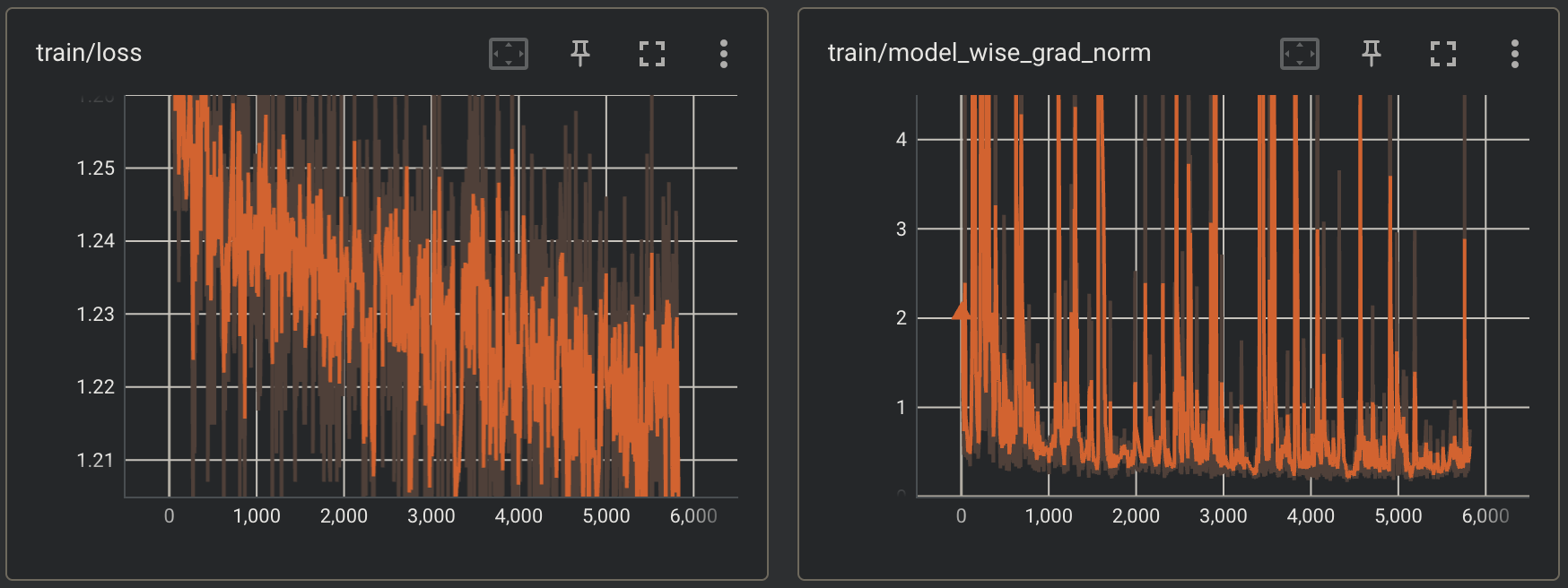
If you open up the TensorBoard you can more closely monitor the run be observing the trends in the graphs of the various logged metrics.
tensorboard --bind_all --logdir="./model_dir"
tensorboard As can be seen above, the screenshots were taken at around step 5800. At this point you can observe that so far, the run seems to progressing well. The losses appear to be trending downwards and the model wise gradient norms don’t appear overly abnormal.

Porting the Model to Hugging Face

Once the pretraining run has finished, you can port the model and checkpoint to Hugging Face. To learn more about how to do this, see Port a trained and fine-tuned model to Hugging Face.

Conclusion

With that, you have completed your first pretraining run with validation on the Cerebras Wafer-Scale Cluster using the ModelZoo Trainer! By now, you should understand how to write your own Trainer configuration and how to kick off a training job on the Cerebras Wafer-Scale Cluster. You can now take this knowledge and pre-train your very own model.