Model Description
DINOv2 is a self-supervised vision transformer model by Meta that learns high-quality image representations without needing labeled data. It builds on the success of DINO by introducing architectural and training enhancements that deliver state-of-the-art performance across various computer vision tasks, including classification.
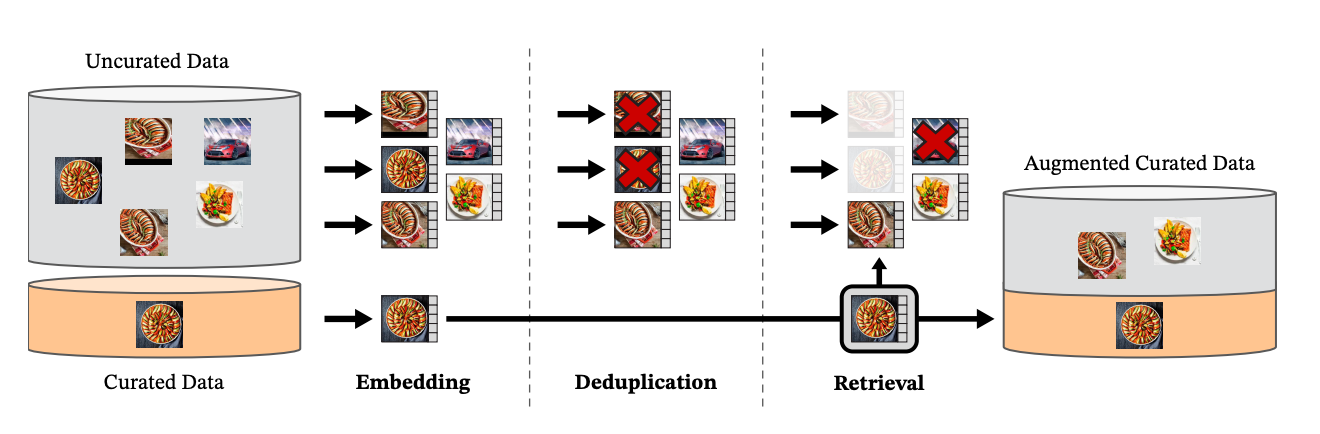
DINOv2 data processing pipeline, from Oquab et al 2023.
Code Structure
The code for this model is located in the dino directory within ModelZoo. Here’s how it’s organized:
-
configs/: Contains YAML configuration files.
-
scripts/: Contains scripts for various workflows, including checkpoint conversion and image resizing.
-
model.py: The implementation of the DINOv2 model.
-
DinoImageDataProcessor.py: Data processor for DINOv2.
Available Configurations
| Configuration | Description |
|---|
params_dinov2_large_224_bs1024.yaml | Config for pretraining, batch size 1024 |
params_dinov2_large_eval_linear.yaml | Config for finetuning with downstream evaluation. |
params_dinov2_large_patch14_img224.yaml | Reference implementation config of DINOv2. |
The tables below outline the expected input tensor formats for pretraining and fine-tuning. These formats are based on the configurations listed in the Available Configurations section above. If you are using a custom configuration, you can check the tensor specifications by running:
cszoo data_processor benchmark <path/to/config> --num_epochs 1 --steps_per_epoch 10
| Input Name | Shape | Data Type | Description |
|---|
collated_masks | (batch_size, 2, 256) | torch.bool | Boolean mask indicating which patches are masked during training. |
global_view | (batch_size, 2, 3, 224, 224) | torch.float32 | Global image views (2 samples per batch, 3-channel images of size 224x224). |
local_view | (batch_size, 8, 3, 98, 98) | torch.float32 | Local image views (8 samples per batch, 3-channel images of size 98x98). |
| Input Name | Shape | Data Type | Description |
|---|
images | (batch_size, 3, 224, 224) | torch.float32 | Preprocessed images. For training, images are augmented (e.g., random resized crop, horizontal flip) and normalized; for evaluation, they are resized and center-cropped. |
labels | (batch_size,) | torch.int32 | Ground truth labels corresponding to each input image. |
About this Implementation
This implementation of DINOv2 uses the generic_image_encoders architecture as its backbone. You can find the model architecture details in its directory.
Unlike Meta’s version, which includes KoLeo loss, this implementation only includes DinoDistillationLoss and iBOTPatchLoss, which was introduced in DINOv2.
Pretrained models from Meta and Hugging Face only include the backbone, meaning they cannot be used for continuous pretraining and are limited to downstream tasks. In contrast, our implementation provides everything needed for continuous pretraining.
Workflow
In this workflow we’ll demonstrate how to get started using DINOv2, inlcuding for pretraining, continuous pretraining, and finetuning tasks.
This workflow utilizes the ModelZoo CLI. For a list of all commands, please visit our CLI page.
Prerequisites and Setup
Before getting started, ensure that you’ve gone through our setup and installation guide.Next, create a dedicated folder for assets (configs, data) and generated files (processed data files, checkpoints, logs, etc.): Pretraining
Continuous Pretraining
Finetuning
Copy the sample model config for pretraining into your folder. cszoo config pull dinov2_large_224_bs1024 -o dinov2
Copy the sample model config for pretraining into your folder. cszoo config pull dinov2_large_eval_linear -o dinov2
Data Preparation
Our implementation of DINOv2 supports all torchvision datasets. In our internal testing, we used ImageNet1K. To get started, set the dataset path to where your torchvision dataset is stored, ensuring it conforms to the torchvision standard. For more information on how to prepare datasets using torchvision, please visit our guide here.Once completed, your dataset directory should look as follows: root_directory
│-- meta.bin
│-- train/
│ │-- n01440764
│ │ │-- n01440764_10026.JPEG
│ │ │-- ...
│ │-- n01443537
│ │ │-- ...
│ │-- ...
│ val/
│ │-- n01440764
│ │ │-- ILSVRC2012_val_00000946.JPEG
│ │ │-- ...
│ │-- n01443537
│ │ │-- ...
│ │-- ...
This implementation does not support on-demand downloading, so make sure to download the dataset beforehand.
Once your data directory is ready, modify the root parameter under dataset in the model config to point to the desired dataset location. Running the Model
Pretraining
Continuous Pretraining
Finetuning
Run the pretraining process using the provided configuration. cszoo fit dinov2/params_dinov2_large_224_bs1024.yaml \
--mgmt_namespace=<namespace>
python src/cerebras/modelzoo/models/vision/dino/run.py CSX \
--mode train \
--params dinov2/params_dinov2_large_224_bs1024.yaml \
--mount_dirs <path/to/source> \
--mgmt_namespace <namespace> \
--python_paths <path/to/source>
In addition to pretraining from scratch, you can continue training from an existing DINOv2 checkpoint. You can do this with your own pretrained checkpoint, using Meta’s checkpoints (after converting to a Cerebras-compatible format) or by using the checkpoint we provide.In this workflow we will use our provided pretrained checkpoint. Download it before getting started.wget -P dinov2 https://cerebras-public.s3.us-west-2.amazonaws.com/DINOv2/DINOv2Pretraining_ViTL_img224.mdl
Once the checkpoint has finished downloading, run the model with the new checkpoint.cszoo fit dinov2/params_dinov2_large_224_bs1024.yaml \
--checkpoint_path dinov2/DINOv2Pretraining_ViTL_img224.mdl \
--load_checkpoint model \
--mgmt_namespace=<namespace>
python src/cerebras/modelzoo/models/vision/dino/run.py CSX \
--checkpoint_path dinov2/DINOv2Pretraining_ViTL_img224.mdl \
--mode train \
--params dinov2/params_dinov2_large_224_bs1024.yaml \
--mount_dirs <path/to/source> \
--mgmt_namespace <namespace> \
--python_paths <path/to/source>
To begin finetuning, update the data_dir parameter in your configuration file. You can find this parameter under fit > train_dataloader and val_dataloader. Set it to the directory containing the data you want to use for fine-tuning.You can finetune DINOv2 using your own pretrained checkpoint or by using the checkpoint we provide. To download our pretrained checkpoint:wget -P dinov2 https://cerebras-public.s3.us-west-2.amazonaws.com/DINOv2/DINOv2Pretraining_ViTL_img224.mdl
Next, convert the pre-trained DINOv2 checkpoint into a ViT-compatible classification format. Since DINOv2 is a self-supervised model, it does not include a classification head by default. The conversion process extracts the ViT backbone and attaches the required classification head.To perform this conversion, run the convert_dinov2_to_vit.py script as follows:python convert_dinov2_to_vit.py \
--input_config dinov2/params_dinov2_large_eval_linear_cszoov2.yaml \
--output_config dinov2/finetuning_params_vit_classification.yaml \
--dataset_path <path/to/data>
--input_ckpt dinov2/DINOv2Pretraining_ViTL_img224.mdl
--output_ckpt dinov2/finetuning_ViTClassification_DINOv2_ViTL_img224.mdl
Once the conversion script has finished running, open up the output configuration that was generated finetuning_params_vit_classification.yaml and specify the backend to be CSX in the init section as follows:trainer:
init:
backend:
backend_type: CSX
cluster_config:
num_csx: 1
The classification head is randomly initialized after the conversion, so the classification accuracy can be expected to be low at the beginning of the training run.
Running Finetuning
CLI
run.py
Tab Title
Tab Title
Once the conversion script has finished running, use the output configuration and checkpoint to train the classification head.cszoo fit dinov2/finetuning_params_vit_classification.yaml \
--checkpoint_path dinov2/finetuning_ViTClassification_DINOv2_ViTL_img224.mdl \
--load_checkpoint model \
--mgmt_namespace=<namespace>
Once the conversion script has finished running, use the output configuration and checkpoint to train the classification head.python src/cerebras/modelzoo/models/vision/dino/run.py CSX \
--checkpoint_path dinov2/finetuning_ViTClassification_DINOv2_ViTL_img224.mdl \
--mode train \
--params dinov2/finetuning_params_vit_classification.yaml \
--mount_dirs <path/to/source> \ #optional
--mgmt_namespace <namespace> \
--python_paths <path/to/source> #optional
We also provide a finetuned ViT classification checkpoint that you can download and use:
wget -P dinov2 https://cerebras-public.s3.us-west-2.amazonaws.com/DINOv2/ViTClassification_DINOv2_ViTL_img224.mdl
Advanced Use Cases
In addition to the workflows outlined above, we provide a number of scripts for more advanced and experimental use cases.
Adjusting Image Size
Our DINOv2 implementation has been tested only with an image size of 224. Using other image sizes may lead to unexpected behavior, therefore this should be considered an experimental feature.
You can continue training from an existing DINOv2 checkpoint while adjusting parameters such as image size. For this purposes, we provide the change_image_size.py to modify the checkpoint and config.
python change_image_size.py \
--input_config dinov2/params_dinov2_large_patch14.yaml \
--input_ckpt <path_to_old_checkpoint> \
--output_config dinov2/params_dinov2_continuous_pretraining.yaml \
--output_ckpt dinov2/dinov2_continuous_pretraining_chkpt.mdl \
--global_size 518 \
--local_size 224
After the script finishes running, it will generate new configuration and checkpoint files. Use these files to start your training run as follows:
cszoo fit dinov2/params_dinov2_continuous_pretraining.yaml --checkpoint_path dinov2/output_config --load_checkpoint model
Configuring Per-Layer Learning Rate Schedulers
As part of our DINOv2 model offering, we provide a script for generating a config file that includes learning rate schedulers, following the approach used in Meta’s original implementation of the model. Users can modify the learning rate settings to experiment with different schedules, but we recommend adhering to Meta’s specifications for optimal results. For a detailed explanation of Meta’s training methods for DINOv2, please refer to the paper.
This script should be used with the reference implementation config that is provided. It will output a configuration similar to params_dinov2_large_224_bs1024_cszoov2.yaml.
To run the script:
To use Meta’s predefined learning rate schedulers without modifications, simply specify only the input_file_name and output_file_name flags.
python /src/modelzoo/models/vision/dino/scripts/create_dinov2_config_with_schedulers.py \
--input_file_name <path/to/your_input_config.yaml> \
--output_file_name <desired_output_config.yaml> \
--base_lr <base learning rate (e.g., 0.0005)> \
--batch_size <batch size for training (e.g., 64)> \
--total_iters <total number of iterations (e.g., 100000)> \
--lr_decay_rate <learning rate decay factor (e.g., 0.1)> \
--patch_emb_multiplier <patch embedding multiplier (e.g., 1.0)>
References